Loading
Get Oh Brook Park Income Tax Return 2022-2026
How it works
-

Open form follow the instructions
-

Easily sign the form with your finger
-

Send filled & signed form or save
How to fill out the OH Brook Park Income Tax Return online
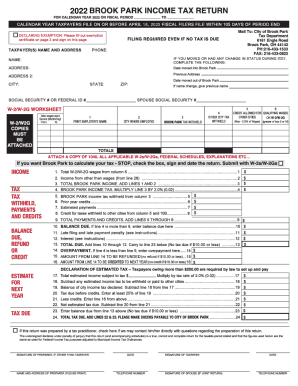
Filing your OH Brook Park Income Tax Return online can streamline your tax preparation process and ensure accuracy. This guide will walk you through each step of completing the form with confidence.
Follow the steps to successfully complete the online form.
- Click ‘Get Form’ button to obtain the OH Brook Park Income Tax Return and open it in the editing interface.
- Begin with your personal information. Fill in your full name, address, and Social Security number in the designated fields. This information must match your identification documents.
- Next, report your income information. Enter your total income from various sources, such as wages, self-employment earnings, and other taxable sources. Ensure that all figures reflect your income for the tax year.
- Proceed to the deductions section. Here, you can input any deductible expenses you qualify for, such as business expenses or contributions to retirement accounts. Carefully review the guidelines for applicable deductions.
- Review the tax credit eligibility. In this section, you may need to enter information that supports any credits you are claiming, such as education or property tax credits. Make sure to check eligibility requirements.
- Once all necessary information is entered, review the entire form for accuracy. Make any necessary corrections to ensure that your submission is error-free.
- Finally, save your changes and choose your preferred option to download, print, or share the completed OH Brook Park Income Tax Return for submission.
Start filling out your OH Brook Park Income Tax Return online today!
Every Ohio resident and every part-year resident is subject to the Ohio income tax. Every nonresident having Ohio-sourced income must also file.