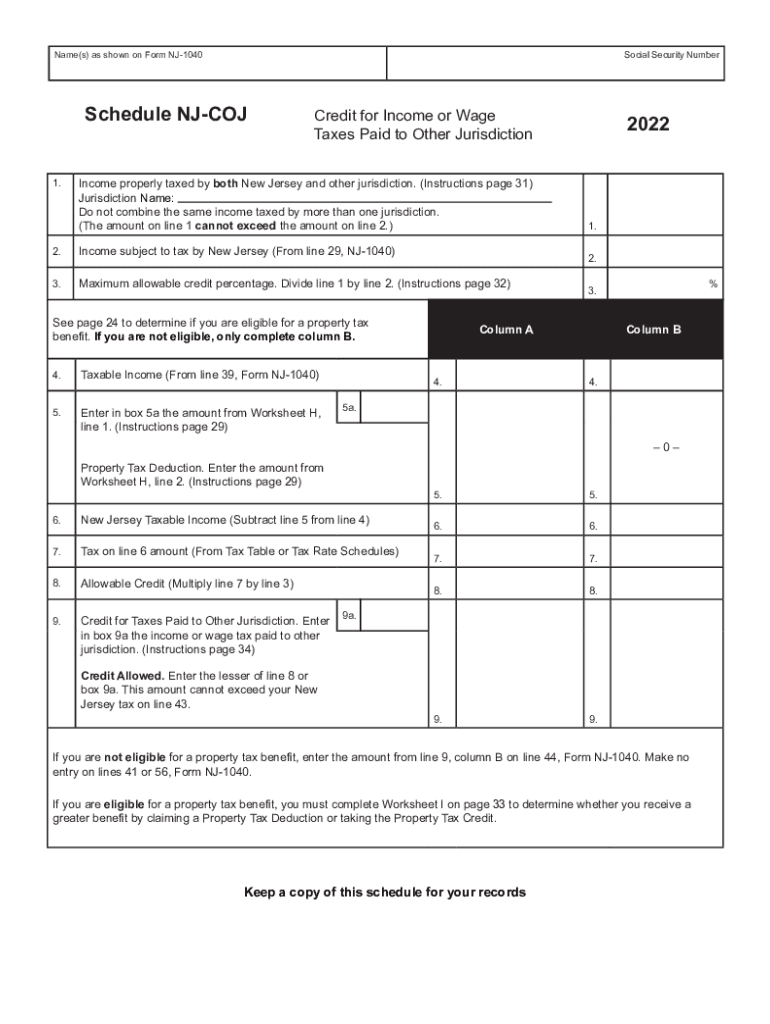
Structions page 31) Jurisdiction Name: Do not combine the same income taxed by more than one jurisdiction. (The amount on line 1 cannot exceed the amount on line 2.) 2. Income subject to tax by New Jersey (From line 29, NJ-1040) 3. Maximum allowable credit percentage. Divide line 1 by line 2. (Instructions page 32) Taxable Income (From line 39, Form NJ-1040) 5. Enter in box 5a the amount from Worksheet H, line 1. (Instructions page 29) 1. 2. See page 24 to determine if you are eligible.
Loading

Open form follow the instructions

Easily sign the form with your finger

Send filled & signed form or save
How to fill out the NJ NJ-1040 Schedule NJ-COJ online
Filling out the NJ NJ-1040 Schedule NJ-COJ is an important step for individuals seeking to claim a credit for income or wage taxes paid to other jurisdictions. This guide will provide clear, step-by-step instructions to help you complete the form accurately online.
Follow the steps to complete your NJ NJ-1040 Schedule NJ-COJ effectively.
- Click ‘Get Form’ button to obtain the form and open it in the editor.
- Enter your name as shown on Form NJ-1040 and your Social Security Number in the designated fields.
- For line 1, input the income that has been taxed by both New Jersey and another jurisdiction. Ensure not to combine the amounts from different jurisdictions.
- On line 2, enter the income that is subject to tax by New Jersey, which you can find from line 29 of your NJ-1040.
- Calculate the maximum allowable credit percentage by dividing the amount on line 1 by the amount on line 2. Enter this value on line 3.
- On line 4, enter your taxable income from line 39 of Form NJ-1040.
- In box 5a, include the amount from Worksheet H, line 1 as specified in the instructions.
- If applicable, determine your eligibility for a property tax benefit based on page 24. If ineligible, complete only column B.
- On line 6, calculate your New Jersey Taxable Income by subtracting line 5 from line 4.
- Refer to the Tax Table or Tax Rate Schedules to calculate the tax on line 6 and fill it in on line 7.
- On line 8, multiply the amount from line 7 by the credit percentage from line 3.
- For line 9, enter the income or wage tax paid to other jurisdictions in box 9a, as specified in the instructions.
- Determine the Credit Allowed by entering the lesser amount from line 8 or box 9a. Ensure this amount does not exceed your New Jersey tax on line 43.
- If ineligible for a property tax benefit, enter the amount from line 9, column B on line 44 of Form NJ-1040. If eligible, complete Worksheet I on page 33 to see if you receive a more significant benefit.
- Review all entries for accuracy before saving changes, and then proceed to download, print, or share the form as needed.
Complete your NJ NJ-1040 Schedule NJ-COJ online today for a smooth filing process.
Experience a faster way to fill out and sign forms on the web. Access the most extensive library of templates available.
Related content
Name(s) as shown on Form NJ-1040. Social Security Number. Schedule NJ-COJ. Credit for...
Complete IRS information, forms and links related to international students and scholars...
CBT exam delivery services to the New Jersey State Board of Cosmetology and ... New Jersey...
Get answers to your most pressing questions about US Legal Forms API.
What line is New Jersey gross income on 1040?
The New Jersey Gross Income amount from your 2021 return can be found on line 29 of your 2021 NJ-1040 return. Please note, if the Division of Taxation has made adjustments to your return for the previous year, the amount on the . pdf of your return may not match what is on file.
What is line 27 on 1040?
Line 27 is where you write in the value of your earned income tax credit, if you qualify.
What is an NJ-1040 form?
New Jersey Form NJ-1040 – Personal Income Tax Return for Residents. New Jersey Form NJ-1040NR – Personal Income Tax Return for Nonresidents. New Jersey 100S K1 – Shareholder's Share of Income/Loss.
Where can I get NJ state income tax forms?
State Tax Forms To order State of New Jersey tax forms, call the Division's Customer Service Center (609-292-6400) to request income tax forms and instructions. To obtain State of New Jersey tax forms in person, make an appointment to visit a Division of Taxation Regional Office.
Where do I mail my 1040 if I live in NJ?
Here's where you want to send your forms if you are enclosing a payment: Alabama, Georgia, Kentucky, New Jersey, North Carolina, South Carolina, Tennessee, Virginia: Internal Revenue Service, P.O. Box 931000, Louisville, KY 40293-1000. Florida, Louisiana, Mississippi, Texas: Internal Revenue Service, P.O.
What is line 29 on New Jersey 1040?
Report the amount of your New Jersey gross income on Line 29 of your NJ-1040. If you were not required to file a return, enter zero as your gross income.
What is New Jersey gross income tax return?
Gross Income Tax is levied on gross income earned or received by New Jersey resident and nonresident individuals, estates, and trusts. New Jersey has a graduated Income Tax rate, which means it imposes a higher tax rate the higher the income.
Is NJ gross income the same as adjusted gross income?
The IRS defines adjusted gross income as “gross income” minus “adjustments to income.” Gross income includes your wages, dividends, capital gains, business income, retirement distributions and other income. Then there are some payments you make that can be deducted or excluded from that amount.
Do I have to pay Philadelphia City wage tax if I live in NJ?
The Philadelphia City Wage Tax is a tax on earnings applied to payments that an individual receives from an employer for work or services. All Philadelphia residents owe the City Wage Tax, regardless of where they work. Non-residents who work in Philadelphia must also pay the Wage Tax.
Use professional pre-built templates to fill in and sign documents online faster. Get access to thousands of forms.
If you believe that this page should be taken down, please follow our DMCA take down process here.