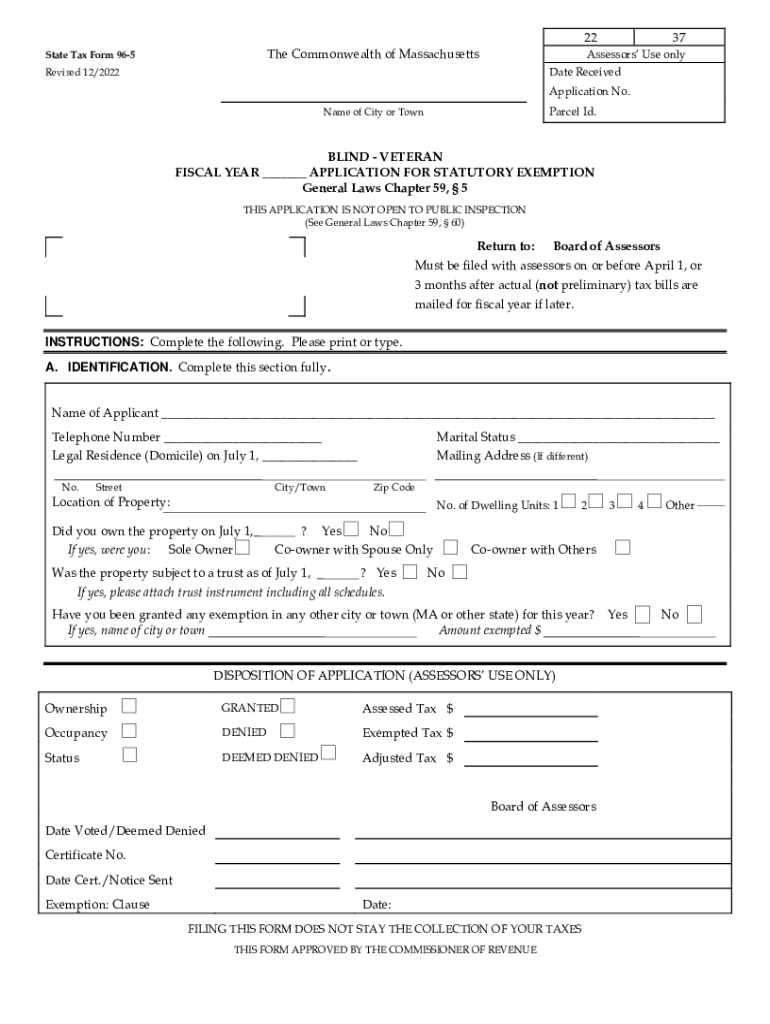
PPLICATION FOR STATUTORY EXEMPTION General Laws Chapter 59, 5 THIS APPLICATION IS NOT OPEN TO PUBLIC INSPECTION (See General Laws Chapter 59, 60) Return to: Board of Assessors Must be filed with assessors on or before April 1, or 3 months after actual (not preliminary) tax bills are mailed for fiscal year if later. INSTRUCTIONS: Complete the following. Please print or type. A. IDENTIFICATION. Complete this section fully. Name of Applicant.

Open form follow the instructions

Easily sign the form with your finger

Send filled & signed form or save
How to fill out the MA Form 96-5 online
Filling out the MA Form 96-5 online can facilitate the process of applying for a statutory exemption related to property taxes in Massachusetts. This guide provides step-by-step instructions to help users complete the form accurately and efficiently.
Follow the steps to complete the MA Form 96-5 online
- Click ‘Get Form’ button to obtain the form and open it in the editor.
- In the Identification section, enter your full name, telephone number, legal residence as of July 1, and marital status. Ensure that your mailing address is updated if it's different from your legal residence.
- Provide information about the property, including the number of dwelling units. Confirm ownership status as of July 1 by selecting from the provided options.
- In the Exemption Status section, check the applicable status for blind persons or veterans. Answer questions regarding registration with the Massachusetts Commission for the Blind or veteran’s details as required.
- If applicable, fill in details regarding the deceased veteran or servicemember, including military service information and documentation needs.
- Complete the Signature section, ensuring that you sign and date the application to affirm that the information provided is true and complete.
- Once all sections are filled out, review the form for accuracy. You can save changes, download, print, or share the completed form as necessary.
File your MA Form 96-5 online today to take advantage of available property tax exemptions.
Experience a faster way to fill out and sign forms on the web. Access the most extensive library of templates available.
Related content
State Tax Form 96-5. The Commonwealth of Massachusetts. Assessors' Use only. Revised...
State Tax Form 96-5. The Commonwealth of Massachusetts. Assessors' Use only. Revised...
Oct 7, 2013 — comprise less than 1% by mass of the total mass. ... Form. Components...
Get answers to your most pressing questions about US Legal Forms API.
How do I get a US tax exemption certificate?
To apply for an initial or renewal tax exemption card, eligible missions and their members should submit an application on the Department's E-Government (E-Gov) system. Applications are generally processed within five business days.
What is a sales tax exemption certificate in Massachusetts?
An exempt use certificate relieves the vendor from the burden of proof only if it is taken in good faith from a purchaser who, at the time of purchase, intends to use the property in an exempt man- ner, or is unable to ascertain at the time of purchase that it will be used in an exempt manner.
How do I get a tax exempt certificate in MA?
If you need to apply for a registration, please complete and file Massachusetts Form TA-1, Application for Original Regis- tration. Form TA-1 may be obtained at any DOR office or by calling (617) 887-MDOR or toll-free, in-state 1-800-392-6089.
Do Massachusetts tax exempt certificates expire?
Vendors should verify the validity of the certificate presented to them by checking the expiration date on the certificate. Vendors must not honor a Certificate of Exemption that has expired. Government organization maintain Form ST-2 Certificates of Exemption that have an expiration date of “None.”
Who is exempt from paying property taxes Massachusetts?
Massachusetts laws Includes clauses for real estate tax exemptions for blind persons, qualifying senior citizens, qualifying surviving spouses, minor children and elderly persons, qualifying veterans, and religious and charitable organizations.
How do I get a sales tax certificate in Massachusetts?
If you need to apply for a registration, go to mass.gov/dor and click on MassTaxConnect to complete an online application for registration. 3. This certificate must be signed by and bear the name and ad dress of the purchaser and his/her Account ID number or Federal Identifica- tion number.
At what age do you stop paying property taxes in MA?
If you are age 65 or older, you may be eligible to claim a refundable credit on your personal state income tax return. The Senior Circuit Breaker tax credit is based on the actual real estate taxes paid on the Massachusetts residential property you own or rent and occupy as your principal residence.
Do 100% disabled veterans pay property taxes Massachusetts?
100% Disabled Property Tax Exemption: Massachusetts General Law (Chapter 59, Section 5, Clause 22E) provides that the homes of those who meet the Massachusetts definition of veteran, and who, as a result of disabilities contracted while in such wartime service and in the line of duty, have a disability rating of 100% ...
Use professional pre-built templates to fill in and sign documents online faster. Get access to thousands of forms.
If you believe that this page should be taken down, please follow our DMCA take down process here.