Loading
Get Ny Nyc Parks Form 40-sc 2015-2026
How it works
-

Open form follow the instructions
-

Easily sign the form with your finger
-

Send filled & signed form or save
How to fill out the NY NYC Parks Form 40-SC online
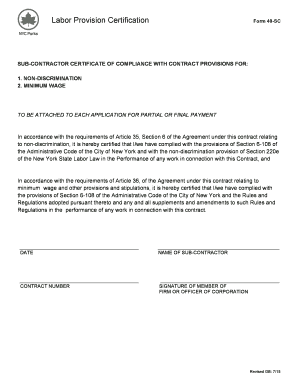
Filling out the NY NYC Parks Form 40-SC is essential for ensuring compliance with labor provisions related to non-discrimination and minimum wage. This guide will provide you with a clear and supportive walkthrough of the online form completion process.
Follow the steps to complete the form efficiently.
- Press the ‘Get Form’ button to access the NY NYC Parks Form 40-SC and open it in your preferred editor.
- In the first section, certify compliance with non-discrimination provisions. This requires you to acknowledge the adherence to Article 35, Section 6, of the Agreement and related laws.
- Fill in the date on the designated line to indicate when you are submitting the certification.
- Provide the name of the sub-contractor in the corresponding field. Ensure to input the full legal name as it appears in official documents.
- Enter the contract number associated with this agreement. This number is crucial for tracking and referencing your submission.
- Sign the form by having a member of the firm or an officer of the corporation provide their signature in the designated space.
- Once you have filled out all required fields, save your changes. You can also download the completed form for your records or print it directly from your editor.
- Share the form with the necessary parties as required by the agreement, ensuring all submissions are completed accurately.
Start your online form completion today to ensure compliance with necessary regulations.