Loading
Form preview
  • US Legal Forms
  • Other Templates
  • More Forms
  • More Multi-State Forms
  • Au F4101 Cfd - Queensland 2021

Get Au F4101 Cfd - Queensland 2021-2026

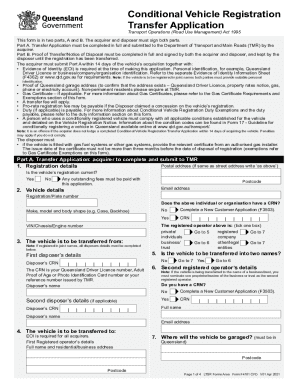
Print FormReset FormConditional Vehicle Registration Transfer Application Transport Operations (Road Use Management) Act 1995This form is in two parts, A and B. The acquirer and disposer must sign.

How it works

  1. Open form

    Open form follow the instructions

  2. Easily sign form

    Easily sign the form with your finger

  3. Share form

    Send filled & signed form or save

How to fill out the AU F4101 CFD - Queensland online

Filling out the AU F4101 CFD - Queensland form is essential for the transfer of vehicle registration in Queensland. This guide provides you with clear, step-by-step instructions to ensure a seamless online experience.

Follow the steps to complete your transfer application online.

  1. Click ‘Get Form’ button to obtain the form and open it in your preferred editor.
  2. Begin with Part A, the Transfer Application, where the acquirer must fill in all required details. Include the registration details and confirm whether the vehicle's registration is current.
  3. In the vehicle details section, provide the vehicle's registration or plate number, make, model, body shape, and VIN/chassis/engine number.
  4. Fill in the details of the disposer, ensuring to include all required CRN information. Select if the vehicle will be registered in one or two names.
  5. Indicate where the vehicle will be garaged in Queensland and provide proof of garage address if necessary.
  6. Complete any necessary sections relating to gas fuel systems, and provide a gas certificate if the vehicle is fitted with such systems.
  7. Review conditional vehicle registration duty obligations and exemptions, ensuring you select the appropriate options.
  8. Sign and date the declaration, ensuring that all required parties (acquirer and disposer) have signed where applicable.
  9. Once all sections are completed, save your changes, and proceed to download, print, or share the form as needed.

Start filling out your AU F4101 CFD - Queensland form online today.

Get form

Experience a faster way to fill out and sign forms on the web. Access the most extensive library of templates available.
Get form

Related content

EX-99.(C)(V) - SEC.gov
The Budget Papers are available online at budget.qld.gov.au ... In Queensland, transfer...
Learn more
Transfer letter sample only queensland state...
... transfer of runs 1848 to 1874 data queensland government, true grit the tale of a...
Learn more
Auslan - Wikipedia
Auslan is the majority sign language of the Australian Deaf community. The term Auslan is...
Learn more

Related links form

IRS 13441-A 2020 IRS Instructions 8915-C 2020 IRS Publication 5307 2020 IRS Publication 3415 2020

Get This Form Now!

Use professional pre-built templates to fill in and sign documents online faster. Get access to thousands of forms.
Get form
If you believe that this page should be taken down, please follow our DMCA take down processhere.
Get AU F4101 CFD - Queensland
Get form
  • Adoption
  • Bankruptcy
  • Contractors
  • Divorce
  • Home Sales
  • Employment
  • Identity Theft
  • Incorporation
  • Landlord Tenant
  • Living Trust
  • Name Change
  • Personal Planning
  • Small Business
  • Wills & Estates
  • Packages A-Z
  • Affidavits
  • Bankruptcy
  • Bill of Sale
  • Corporate - LLC
  • Divorce
  • Employment
  • Identity Theft
  • Internet Technology
  • Landlord Tenant
  • Living Wills
  • Name Change
  • Power of Attorney
  • Real Estate
  • Small Estates
  • Wills
  • All Forms
  • Forms A-Z
  • Other Templates
  • Legal Hub
  • About Us
  • Help Portal
  • Legal Resources
  • Blog
  • Affiliates
  • Contact Us
  • Delete My Account
  • Site Map
  • Industries
  • Forms in Spanish
  • Localized Forms
  • State-specific Forms
  • Forms Kit
  • Real Estate Handbook
  • All Guides
  • Notarize
  • Incorporation services
  • For Consumers
  • For Small Business
  • For Attorneys
  • USLegal
  • FormsPass
  • pdfFiller
  • signNow
  • altaFlow
  • DocHub
  • Instapage
Form Packages
  • Adoption
  • Bankruptcy
  • Contractors
  • Divorce
  • Home Sales
  • Employment
  • Identity Theft
  • Incorporation
  • Landlord Tenant
  • Living Trust
  • Name Change
  • Personal Planning
  • Small Business
  • Wills & Estates
  • Packages A-Z
Form Categories
  • Affidavits
  • Bankruptcy
  • Bill of Sale
  • Corporate - LLC
  • Divorce
  • Employment
  • Identity Theft
  • Internet Technology
  • Landlord Tenant
  • Living Wills
  • Name Change
  • Power of Attorney
  • Real Estate
  • Small Estates
  • Wills
  • All Forms
  • Forms A-Z
  • Other Templates
Customer Service
  • Legal Hub
  • About Us
  • Help Portal
  • Legal Resources
  • Blog
  • Affiliates
  • Contact Us
  • Delete My Account
  • Site Map
  • Industries
  • Forms in Spanish
  • Localized Forms
  • State-specific Forms
  • Forms Kit
Legal Guides
  • Real Estate Handbook
  • All Guides
Prepared for you
  • Notarize
  • Incorporation services
Our Customers
  • For Consumers
  • For Small Business
  • For Attorneys
Our Sites
  • USLegal
  • FormsPass
  • pdfFiller
  • signNow
  • altaFlow
  • DocHub
  • Instapage
Social Media
Call us now toll free:
+1 833 426 79 33
As seen in:
© Copyright 1999-2026 airSlate Legal Forms, Inc. 17 Station Street, Ste. 203, Brookline, MA 02445
  • Your Privacy Choices
  • Terms of Service
  • Privacy Notice
  • Content Takedown Policy
  • Bug Bounty Program