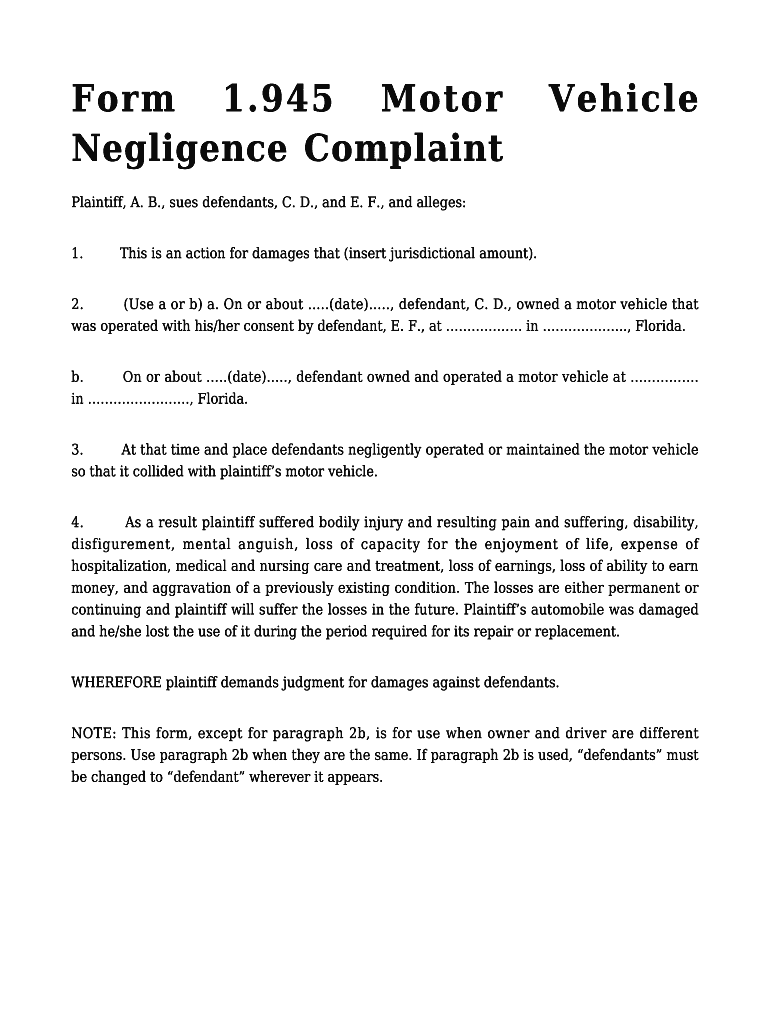
Form 1.945 Motor Negligence ComplaintVehiclePlaintiff, A. B., sues defendants, C. D., and E. F., and alleges: 1. This is an action for damages that (insert jurisdictional amount).2. (Use a or b) a.
Loading

Open form follow the instructions

Easily sign the form with your finger

Send filled & signed form or save
How to fill out the FL Form 1.945 online
Filling out the FL Form 1.945 is a crucial step for individuals seeking to file a motor negligence complaint. This guide offers clear, step-by-step instructions to help you navigate the online process effectively.
Follow the steps to complete the FL Form 1.945 seamlessly.
- Click ‘Get Form’ button to access the form and open it in the designated editor.
- Begin by entering the jurisdictional amount in the provided field. This amount indicates the damages being claimed in your complaint.
- Select option 'a' or 'b' under paragraph 2 based on the facts of your case. If the vehicle owner is different from the operator, choose option 'a' and fill in the driver and vehicle owner's information. If they are the same, select option 'b' and provide the necessary details for just one individual.
- Detail the circumstances of the incident in paragraph 3. Clearly state how the negligent operation of the vehicle led to the collision with your motor vehicle.
- In paragraph 4, outline the specific damages and injuries you have suffered as a result of the accident. Be thorough in listing any bodily injuries, emotional distress, medical expenses, and loss of income.
- Review all the information entered for accuracy and completeness. Ensure that all relevant fields are filled out properly.
- Once satisfied with the completed form, you can save your changes, download a copy of the form, print it, or share it as needed.
Complete your forms online today and ensure your rights are protected.
Experience a faster way to fill out and sign forms on the web. Access the most extensive library of templates available.
Related content
ONE FORM OF ACTION. [NO CHANGE]. 1.050. WHEN ACTION COMMENCED ... 1.945. MOTOR VEHICLE...
amend the Florida Rules of Civil Procedure under Fla. R. Jud. Admin. 2.140(e). As ... form...
combines to form a virtually perfect cable core eliminating unequal electrical stress....
Get answers to your most pressing questions about US Legal Forms API.
How long does someone have to serve you in Florida?
Florida Rule of Civil Procedure 1.070 (j) states that a complaint must be served upon the defendant within 120 days after the complaint is filed. If it is not served within this time frame, a motion to dismiss is appropriate and the case is dismissed without prejudice.
What is a driver's duty of care in Florida?
When individuals drive in Florida, they are considered to owe a duty of care to the other drivers on the road. A driver is expected to take any and all precautions to drive in a safe manner at all times. Reasonable care is expected to be taken into account with every vehicle in a foreseeable zone of danger.
What is the Rule for response to a complaint in Florida?
When must a defendant respond to the complaint? In Florida, unless a different time is prescribed by statute, a defendant must serve an answer within either: 20 days after service of original process and the initial pleading (typically a complaint). The date fixed in a notice by publication.
What is auto negligence lawsuit Florida?
In order to succeed in a car accident negligence claim in the state of Florida, injury victims must prove that that an at fault party, failed to do something that a reasonably careful person would do, or failed to do something that reasonably careful person would not do.
How many days do you have to serve a complaint Florida?
In Florida, ing to Rule of Civil Procedure 1.070 (j), a complaint must be served on the defendant within 120 days of its filing. If it is not served within the time frame specified, a motion to dismiss is appropriate, and the case is dismissed without prejudice.
How do I count days to respond to a complaint in Florida?
Count five days starting with the day after you are served the summons. Do not count Saturdays, Sundays, or legal holidays. All other summonses will give you twenty (20) days to file your answer. Count twenty days starting with the day after you are served, and count every day, including Saturdays and Sundays.
What is the deadline for service of process in Florida?
From there, you will need a copy of each official summons (the one with the clerk's signature and seal) and a copy of the complaint and any of its attachments (one copy for each defendant). You must serve those documents on each defendant within 90 days of filing the complaint or risk dismissal of your case.
What are the rules for process servers in Florida?
What is a Process Server in Florida? At least 18 years old. Has no legal or mental disability. Is a permanent resident of Florida. Submits to and passes a criminal background check. Passes a yearly exam on the rules of serving process. Takes an official oath.
Use professional pre-built templates to fill in and sign documents online faster. Get access to thousands of forms.
If you believe that this page should be taken down, please follow our DMCA take down process here.