Loading
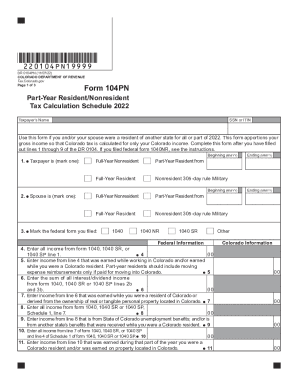
Get Co Dor 104pn 2022-2026
How it works
-

Open form follow the instructions
-

Easily sign the form with your finger
-

Send filled & signed form or save
How to fill out the CO DoR 104PN online
Filling out the CO DoR 104PN form online can seem daunting, but with clear guidance, you can complete it smoothly. This document serves as a roadmap to help you accurately report your income as a part-year resident or nonresident in Colorado.
Follow the steps to complete the CO DoR 104PN online.
- Click ‘Get Form’ button to access the CO DoR 104PN and open it for editing.
- Begin by entering your name and SSN or ITIN at the top of the form. This identifies you as the taxpayer.
- In section 1, select whether you are a full-year resident, part-year resident, or nonresident by marking the appropriate option.
- For your spouse, if applicable, fill in their status in section 2 by marking the relevant box.
- Complete the federal information section by entering your total income as reported on your federal form 1040, 1040 SR, or 1040 SP in line 4.
- Proceed to line 5 and input the income earned in Colorado, specifically during the time you were a resident. If you are a part-year resident, include only applicable reimbursements.
- Fill in lines 6 through 9 by following the prompts for interest, dividends, and unemployment benefits, ensuring you indicate the source and residency status.
- Continue to complete lines 10 through 21, inputting other types of income and summing up your total Colorado income as needed.
- In the adjustments section, enter any federal adjustments you may have that apply. Follow the instructions closely for accurate reporting.
- Finally, review all your entries for accuracy. Once you are satisfied, you can save your changes, download, print, or share the completed form as necessary.
Start filling out the CO DoR 104PN online today to ensure your income is accurately reported.
The DR 88454 replaces the DR 8453 for tax year 2022 and forward.