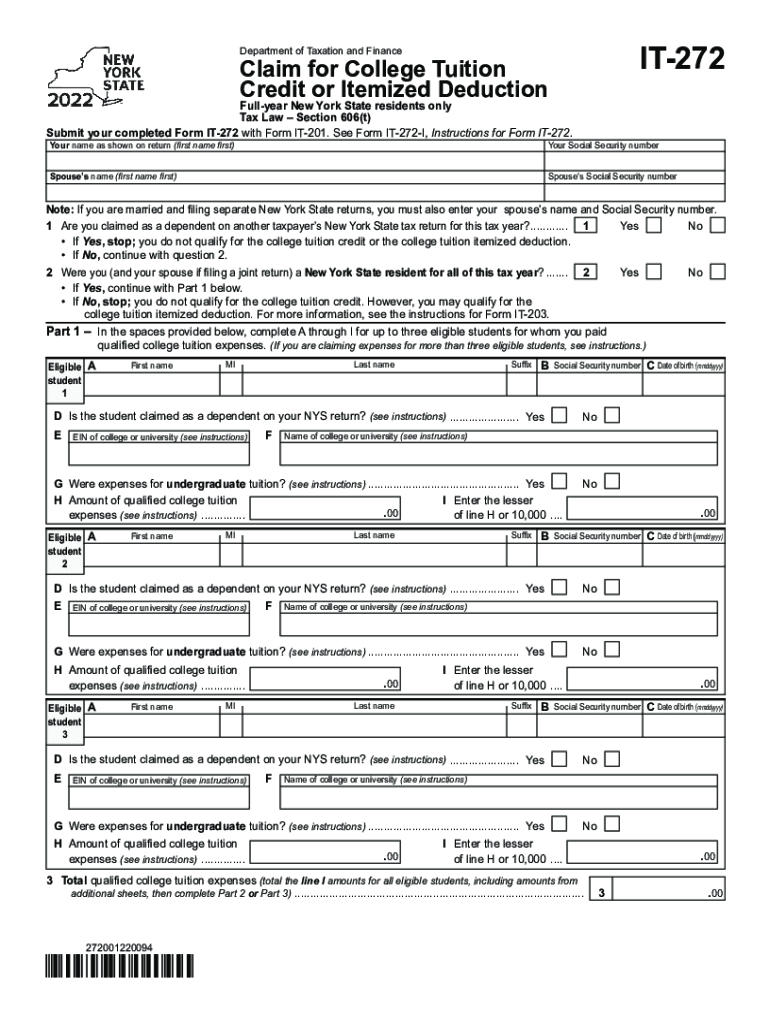
72 with Form IT-201. See Form IT-272-I, Instructions for Form IT-272. Your name as shown on return (first name first) Your Social Security number Spouse s name (first name first) Spouse s Social Security number Note: If you are married and filing separate New York State returns, you must also enter your spouse s name and Social Security number. 1 Are you claimed as a dependent on another taxpayer s New York State tax return for this tax year?............. 1 Yes No If Yes, stop; y.
Loading

Open form follow the instructions

Easily sign the form with your finger

Send filled & signed form or save
How to fill out the NY Form IT-272 online
Filling out the NY Form IT-272 can seem daunting, but this guide provides clear and supportive instructions to help you complete it online. By following these steps, you can ensure that you accurately claim your college tuition credit or itemized deduction.
Follow the steps to successfully complete your form online.
- Click ‘Get Form’ button to obtain the form and open it in the editor.
- Begin with entering your name as shown on your tax return, followed by your Social Security number. If applicable, provide your spouse's name and Social Security number as well.
- Respond to the question about being claimed as a dependent on another taxpayer's New York State tax return. If you are a dependent, you will not qualify for the credit or itemized deduction.
- Indicate whether you and your spouse (if applicable) were New York State residents for the entire tax year. If not, further instructions will guide you based on your situation.
- In Part 1, provide information for up to three eligible students for whom you have paid qualified college tuition expenses. Fill out the required fields for each student, including their first name, last name, Social Security number, date of birth, and the name and EIN of their college or university.
- Confirm if each student is claimed as a dependent on your New York State return and whether the expenses are for undergraduate tuition.
- Enter the total qualified college tuition expenses for all eligible students in line 3. This includes amounts from additional sheets if applicable.
- Depending on whether your total expenses are less than $5,000 or $5,000 and more, follow the instructions in Part 2 or Part 3 to determine your college tuition credit.
- If you itemized deductions on your New York return, proceed to Part 4 to elect between the college tuition itemized deduction or credit. Make your selection by marking the correct box.
- Finally, review all entered information for accuracy, save your changes, and you have the option to download, print, or share the completed form.
Complete your NY Form IT-272 online today to ensure you receive the benefits you're entitled to!
Experience a faster way to fill out and sign forms on the web. Access the most extensive library of templates available.
Related content
Credit or Itemized Deduction. Full-year New York State residents only. Tax Law – Section...
If your total qualified college tuition expenses for all eligible students total less than...
Instructions for Form IT-203. Nonresident and Part-Year Resident. Income Tax Return. New...
Use professional pre-built templates to fill in and sign documents online faster. Get access to thousands of forms.
If you believe that this page should be taken down, please follow our DMCA take down process here.