Loading
Get Ct Drs Ct-w3 2022-2026
How it works
-

Open form follow the instructions
-

Easily sign the form with your finger
-

Send filled & signed form or save
How to fill out the CT DRS CT-W3 online
Filling out the CT DRS CT-W3 form online is a straightforward process designed to help employers reconcile their withholding tax obligations in Connecticut. This guide provides clear, step-by-step instructions to ensure you complete the form accurately and efficiently.
Follow the steps to complete your CT DRS CT-W3 online.
- Press the ‘Get Form’ button to obtain the CT-W3 form and open it in your preferred digital format.
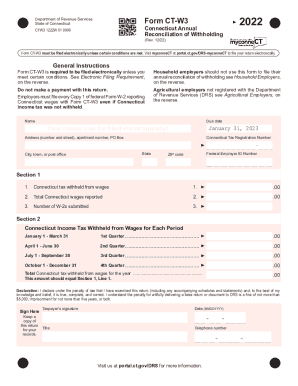
- Enter your name, address (including apartment number and PO Box if applicable), Connecticut tax registration number, city or town, federal employer ID number, and ZIP code in the designated fields.
- In Section 1, complete Line 1 by entering the total Connecticut income tax withheld from wages during the year. This total should match the entry from Section 2, Line 4. Move on to Line 2 and report the total Connecticut wages you have paid during the year.
- For Line 3, indicate the number of W-2 forms you are submitting along with the CT-W3.
- Proceed to Section 2 to break down the Connecticut income tax withheld from wages for each quarter. Input the amounts for each respective quarter — First Quarter, Second Quarter, Third Quarter, and Fourth Quarter.
- Ensure that the total Connecticut tax withheld from wages for the year, shown in Section 2, Line 4, matches the amount reported in Section 1, Line 1.
- Read and sign the declaration section. Provide the taxpayer's signature, date, title, and telephone number in the designated fields.
- Finally, review all entries for accuracy. Once confirmed, you can save changes, download, print, or share the completed form as necessary.
Complete your CT DRS CT-W3 filing online today!