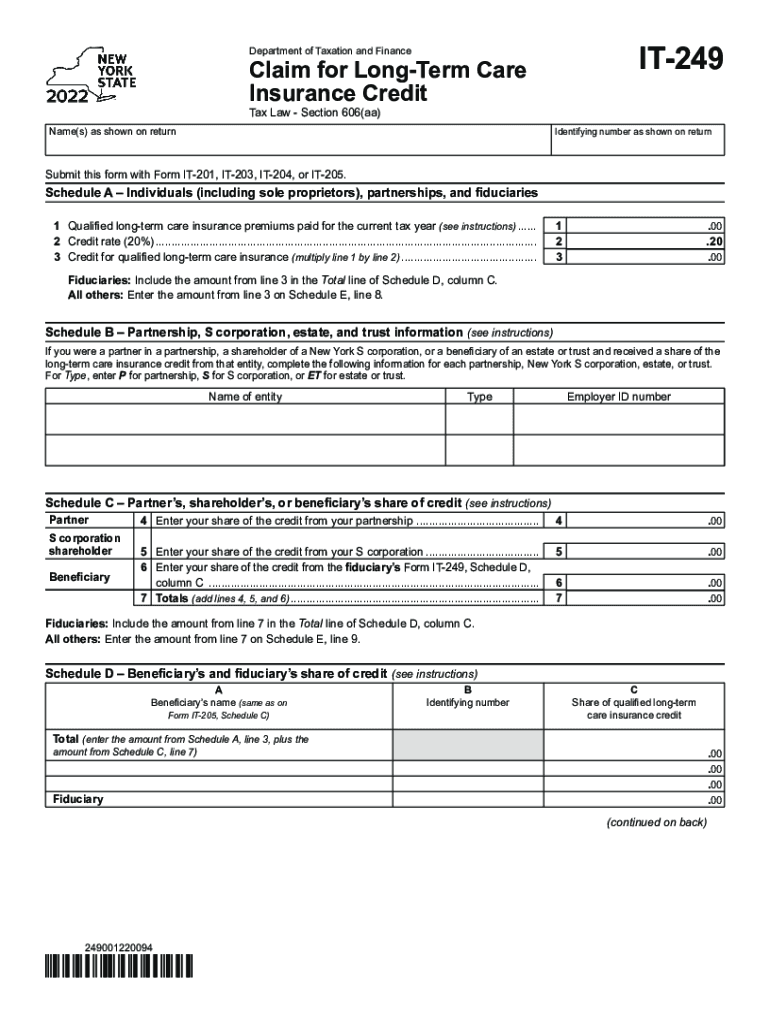
With Form IT-201, IT-203, IT-204, or IT-205. Schedule A Individuals (including sole proprietors), partnerships, and fiduciaries 1 Qualified long-term care insurance premiums paid for the current tax year (see instructions)....... 2 Credit rate (20%).......................................................................................................................... 3 Credit for qualified long-term care insurance (multiply line 1 by line 2) .
Loading

Open form follow the instructions

Easily sign the form with your finger

Send filled & signed form or save
How to fill out the NY IT-249 online
Filling out the NY IT-249 form can seem daunting, but this guide is here to help you navigate each section with ease. Whether you are claiming for long-term care insurance credits or need detailed instructions on specific fields, we will provide you with clear, step-by-step guidance to complete the form successfully.
Follow the steps to complete the NY IT-249 form effectively.
- Press the ‘Get Form’ button to access the NY IT-249 form. This will open the document in the online editor, ready for you to fill it out.
- Begin by entering your name(s) as shown on your tax return and your identifying number in the designated fields at the top of the form.
- Proceed to Schedule A. Here, you will report the qualified long-term care insurance premiums you paid during the current tax year. Record this amount on line 1.
- Next, indicate the credit rate, which is 20%, on line 2. Multiply the amount from line 1 by the credit rate to determine your credit for qualified long-term care insurance and record it on line 3.
- If you are a fiduciary, ensure that you include the amount from line 3 in the Total line of Schedule D, column C. If you are not a fiduciary, enter this amount on Schedule E, line 8.
- Move to Schedule B, where you will complete the information regarding partnerships, S corporations, or trusts with which you share the credit. Provide the required details, including name of the entity, type, and Employer ID number.
- In Schedule C, input your individual share of credits from partnerships and S corporations. Make sure to accurately reflect the amounts on lines 4, 5, and 6. Add these to find your totals and record on line 7.
- Continue to Schedule D and fill in the names and identifying numbers of beneficiaries, along with their share of the qualified long-term care insurance credit. Calculate the total for these entries.
- Proceed to Schedule E to compute the total credit available for the current year. Record lines 8, 9, and 10 and ensure that the total is added correctly.
- If you are a full-year New York State resident, complete Schedule F. If you are a nonresident or part-year resident, complete Schedule G. These sections detail the computation of credits based on residency type.
- Finally, use Schedule H to calculate your tax due before credits, applied credits, net tax, and to find the amount of credit you will carry over to the next year.
- Once you have completed all relevant sections, save any changes, and download, print, or share the filled form as needed.
Start filling out your NY IT-249 form online today to take advantage of potential long-term care insurance credits.
Experience a faster way to fill out and sign forms on the web. Access the most extensive library of templates available.
Related content
If you were a partner in a partnership, a shareholder of a New York S corporation, or a...
Section B — New York State nonrefundable/carryover credits. 4 Long-term care insurance...
New York State Route 249 (NY 249) is a 13.50-mile (21.73 km) long state highway located...
Use professional pre-built templates to fill in and sign documents online faster. Get access to thousands of forms.
If you believe that this page should be taken down, please follow our DMCA take down process here.