Loading
Get Ak Dor 6390 2022-2026
How it works
-

Open form follow the instructions
-

Easily sign the form with your finger
-

Send filled & signed form or save
How to fill out the AK DoR 6390 online
This guide provides a clear and supportive overview of how to complete the AK DoR 6390 form online. Users will receive step-by-step instructions to ensure accurate and efficient completion of the document.
Follow the steps to successfully complete the AK DoR 6390 form online.
- Click the ‘Get Form’ button to access the AK DoR 6390 form and open it for editing.
- Enter your Employer Identification Number (EIN) at the top of the form. Ensure this number corresponds to the business entity for which you are filing.
- Provide the name shown on your federal tax return to maintain consistency across your filings.
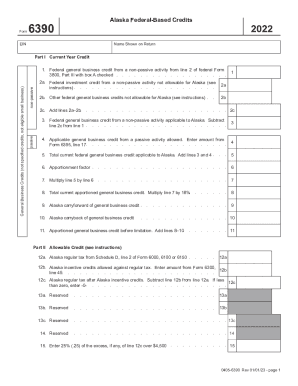
- For Part I, current year credit, indicate whether the credits are for non-passive or passive activities by checking the appropriate box.
- Complete line 1 by entering the federal general business credit from a non-passive activity from federal Form 3800, ensuring that box A is checked.
- Proceed to lines 2a and 2b to report any federal investment credits and other general business credits not applicable for Alaska.
- Sum the amounts from lines 2a and 2b on line 2c.
- Subtract line 2c from line 1 and enter the result on line 3, which reflects the federal general business credit applicable to Alaska.
- For line 4, enter the applicable general business credit from a passive activity by referring to Form 6395.
- Add the results from line 3 and line 4 for line 5 to determine the total current federal general business credit applicable to Alaska.
- Input the apportionment factor on line 6, which affects how credits are allocated based on factors specific to your organization.
- Multiply line 5 by line 6 and document the result on line 7.
- Further multiply the result from line 7 by 18% to display the total current apportioned general business credit on line 8.
- Report any Alaska carryforward on line 9, which tracks credits that can be applied to future tax periods.
- Sum lines 8 and 10 for line 11, representing the apportioned general business credit before limitation.
- Input your Alaska regular tax on line 12a using the previous schedules.
- Report Alaska incentive credits on line 12b and calculate your regular tax after these credits on line 12c.
- Continue processing the remaining sections of the form, which include 'Allowable Credit' and 'Tax Limitation', following the same approach of careful data entry.
- Once all sections are completed, review your entries for accuracy.
- Save your changes, download the completed form, and print or share it as required.
Complete your AK DoR 6390 form online today to ensure all necessary credits are claimed accurately.