Loading
Get Ny It-640 2022-2026
How it works
-

Open form follow the instructions
-

Easily sign the form with your finger
-

Send filled & signed form or save
How to fill out the NY IT-640 online
This guide provides a comprehensive overview of how to complete the NY IT-640 form online. Users will find clear, step-by-step instructions tailored to their needs, ensuring a smooth filing process.
Follow the steps to complete the NY IT-640 form successfully.
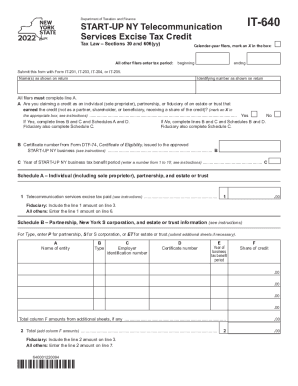
- Press the ‘Get Form’ button to access the NY IT-640 form and open it in your browser.
- Identify your filing type. If you are a calendar-year filer, mark an X in the appropriate box. If not, enter your tax period's beginning and ending dates.
- Provide your name(s) as displayed on your return and your identifying number as shown on the return. All filers must complete line A.
- Determine if you are claiming a credit as an individual, partnership, or fiduciary. Mark an X in the respective box. Depending on your answer, complete the relevant lines: If Yes, complete lines B and C and Schedules A and D. If No, complete lines B and C and Schedules B and D.
- For line B, enter the certificate number from Form DTF-74, issued to the approved START-UP NY business.
- For line C, specify the year of the START-UP NY business tax benefit period, entering a number between 1 and 10.
- Complete Schedule A if applicable, entering the telecommunication services excise tax paid. Ensure fiduciaries include the amount on the correct line.
- If you are a partnership or New York S corporation, complete Schedule B, providing the relevant information for each entity involved.
- In Schedule C, if you are a fiduciary, calculate the total share of credit allocated to beneficiaries, entering the relevant amounts in the provided fields.
- Fill out Schedule D to compute the total credit, bringing amounts from previous lines together as instructed.
- Once all fields are completed, save your changes, and you will have options to download, print, or share the form as needed.
Complete your NY IT-640 form online today to ensure timely and accurate filing.