Loading
Get Ny It-638 2022-2026
How it works
-

Open form follow the instructions
-

Easily sign the form with your finger
-

Send filled & signed form or save
How to fill out the NY IT-638 online
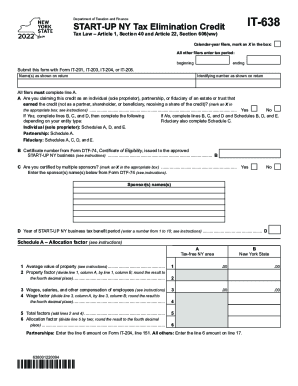
The NY IT-638 form is essential for claiming the Start-Up NY tax elimination credit. This guide will provide clear, step-by-step instructions to assist users in completing this form accurately online.
Follow the steps to fill out the NY IT-638 form online.
- Click 'Get Form' button to obtain the form and open it in an online editor.
- Indicate your filing period. If you are a calendar-year filer, mark an X in the designated box. For all other filers, enter your tax period's beginning and ending dates.
- Provide your name(s) as shown on your return and the identifying number as shown on your return.
- Complete line A by indicating if you are claiming this credit as an individual, partnership, or as fiduciary of an estate or trust by marking the appropriate box.
- If you answered 'No' to line A, complete lines B, C, and D as well as Schedules B, D, and E. If you answered 'Yes', complete these lines and then continue to the additional requirements per your entity type.
- Enter the certificate number from Form DTF-74 in line B and indicate if you are certified by multiple sponsors in line C, entering sponsors' names if applicable.
- For line D, indicate the year of your Start-Up NY business tax benefit period by entering a number between 1 and 10.
- Proceed to Schedule A and calculate the allocation factor based on property value and wages, following the instructions carefully.
- For partnerships, enter the allocation factor on Form IT-204, line 151. For all other filers, enter it on line 17.
- Complete the necessary information on Schedule B and Schedule C based on your entity type, ensuring all details are accurate.
- Fill out Schedule D to determine the tax factor and complete Schedule E for the computation of credit.
- Review all entries for correctness. Once completed, save changes, download, print, or share the form as needed.
Complete your NY IT-638 form online today for a smoother filing experience.