Loading
Get Ny It-203-gr-att-b 2022-2026
How it works
-

Open form follow the instructions
-

Easily sign the form with your finger
-

Send filled & signed form or save
How to fill out the NY IT-203-GR-ATT-B online
Filling out the NY IT-203-GR-ATT-B form is essential for partnerships that include nonresident partners participating in a Yonkers group return. This guide offers a straightforward approach to help you navigate the online completion of this important tax document.
Follow the steps to efficiently complete your NY IT-203-GR-ATT-B.
- Utilize the ‘Get Form’ button to acquire the NY IT-203-GR-ATT-B form and bring it up in the online editor.
- Begin by entering the legal name of the partnership at the designated location on the form.
- Provide the special NY State identification number, ensuring that it is accurate.
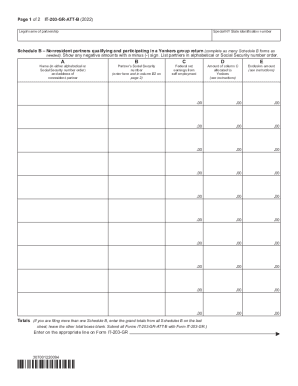
- Move to Schedule B, where you will identify nonresident partners. Complete individual Schedule B forms as necessary for each partner.
- In column A, input the name and address of each nonresident partner. You can list partners in alphabetical order or by their Social Security number.
- In column B, record the partner’s Social Security number as directed. Ensure it matches the information previously noted.
- Insert the federal net earnings from self-employment for each partner in column C.
- Allocate the amount specific to Yonkers in column D by cross-referencing the instructions provided.
- If applicable, enter the exclusion amount in column E.
- On the final Schedule B, calculate the totals for each column accurately and ensure all totals are reflected on the last sheet submitted.
- Proceed to the second page of the form by inputting the obtained Social Security numbers again in column B2 for consistency.
- Complete the calculations necessary for Yonkers taxable earnings, nonresident earnings tax, estimated income tax paid, and any balances due or overpayments as outlined in the instructions.
- After ensuring all information is accurate, you may save changes, download, print, or share the completed form as needed.
Start filling out your NY IT-203-GR-ATT-B online today for accurate tax reporting.