Loading
Get Ny It-601 2022-2026
How it works
-

Open form follow the instructions
-

Easily sign the form with your finger
-

Send filled & signed form or save
How to fill out the NY IT-601 online
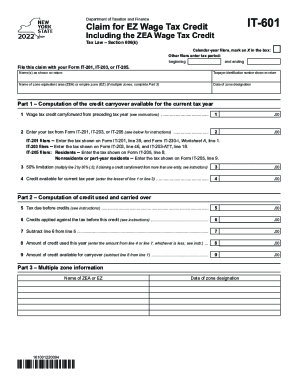
The NY IT-601 form is used to claim the EZ wage tax credit and must be filed alongside your tax return. This guide will provide you with clear instructions on how to properly fill out the form online, ensuring you understand each section and field.
Follow the steps to complete the NY IT-601 form online.
- Click ‘Get Form’ button to obtain the form and open it in the editor.
- Indicate your filing status by marking an X in the box for calendar-year filers or entering the tax period for other filers with the start and end dates.
- Fill in your name(s) as they appear on your tax return along with the taxpayer identification number that is also shown on the return.
- Provide the name of the zone equivalent area (ZEA) or empire zone (EZ). If you are reporting multiple zones, be sure to complete Part 3.
- Enter the date when the zone designation occurred.
- In Part 1, compute the credit carryover available for the current tax year by entering the wage tax credit carryforward from the preceding tax year in line 1.
- For line 2, enter your tax amount from the corresponding form (IT-201, IT-203, or IT-205) as indicated in the instructions referring to each form.
- Calculate the 50% limitation for line 3 by multiplying line 2 by 50%. If you are claiming a credit carryforward from multiple entities, make sure to follow the specific instructions.
- Enter the lesser of line 1 or line 3 on line 4 as the credit available for the current tax year.
- Next, fill out line 5 with the tax due before credits as per the instructions.
- In line 6, report any credits that have been applied against the tax prior to this credit.
- Subtract line 6 from line 5 and enter the result on line 7.
- On line 8, input the amount of credit you used this year, which should be the lesser value between line 4 and line 7.
- Finally, calculate the amount of credit available for carryover in line 9 by subtracting line 8 from line 1.
- Once all sections are complete, you can save your changes, download the form, print it for submission, or share it as necessary.
Ready to file your NY IT-601 form online? Complete the document today for a smooth filing experience.