Loading
Get Ny It-360.1 2022-2026
How it works
-

Open form follow the instructions
-

Easily sign the form with your finger
-

Send filled & signed form or save
How to fill out the NY IT-360.1 online
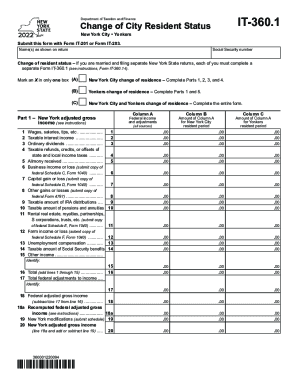
The NY IT-360.1 form is essential for individuals changing their city resident status in New York. Completing this form online is straightforward and provides a seamless way to manage your tax responsibilities.
Follow the steps to accurately complete the NY IT-360.1 online.
- Press the ‘Get Form’ button to access the NY IT-360.1 form and open it for editing.
- Input your name as it appears on your tax return in the designated field. Ensure this matches your official documents.
- Enter your Social Security number accurately in the appropriate section to verify your identity.
- Determine your change of resident status and mark the corresponding box (A for New York City, B for Yonkers, or C for both).
- Fill out Part 1, providing your New York adjusted gross income for the specified periods. Ensure each entry is accurate and corresponds with your records.
- Complete Part 2 if claiming itemized deductions. If you are using the standard deduction, skip this section.
- In Part 3, indicate the duration of your New York City residency during 2022 along with the number of dependent exemptions you are claiming.
- Navigate to Part 4 and calculate your New York City resident tax, based on the information you have provided in previous sections.
- If applicable, fill out Part 5 regarding the Yonkers resident income tax surcharge, ensuring you follow the instructions given.
- Once completed, save your changes. You may also download, print, or share the form for your records.
Take action now by completing the NY IT-360.1 online to manage your tax situation effectively.