Loading
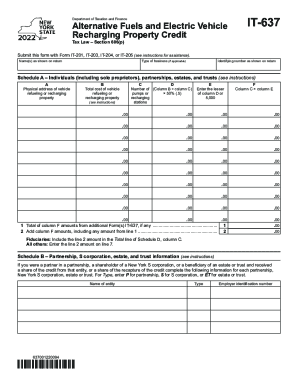
Get Ny It-637 2022-2026
How it works
-

Open form follow the instructions
-

Easily sign the form with your finger
-

Send filled & signed form or save
How to fill out the NY IT-637 online
Filling out the NY IT-637 form online is an essential step for individuals and businesses looking to claim the alternative fuels and electric vehicle recharging property credit. This guide provides clear, step-by-step instructions to ensure that users can accurately complete the form.
Follow the steps to successfully complete the NY IT-637 form.
- Click 'Get Form' button to access the NY IT-637 form and open it in your preferred editing environment.
- Enter your name(s) as shown on your tax return in the designated field at the top of the form.
- If applicable, specify the type of business you operate in the appropriate section.
- Provide your identifying number as it appears on your return.
- Complete Schedule A: Input the physical address of the vehicle refueling or recharging property in field A. Fill in the total cost of the property in field B.
- Indicate the number of pumps or recharging stations in column C. Calculate the figure for column D by dividing the total cost in column B by the number of pumps or stations in column C, and then multiply by 50%.
- In column E, enter the lesser amount between column D and $5,000. For column F, multiply the amount in column C by the amount in column E to compute the final figure.
- If you have additional Form(s) IT-637, total the amounts from column F and report that total in line 1.
- Add the amounts from column F and include anything from line 1, entering that figure into line 2.
- Complete Schedule B by providing details for any partnerships, S corporations, or trusts relevant to you, including the entity's name, type, and employer identification number.
- Finish filling out Schedule C, entering the credit amounts you received from partnerships or S corporations as instructed.
- For fiduciaries, report the figures accurately in Schedule D and ensure the total from line 6 is included.
- Proceed to complete Schedule E by using the total figures from previous sections to calculate your credit.
- If applicable, fill out Schedule F for recapturing credits, making sure to include any necessary calculations.
- Finally, complete Schedule G by calculating your tax due before credits and the application of credits for the current and next year.
- Review all entries for accuracy, then save your changes. You can also download, print, or share the completed form as necessary.
Complete your documents online to take full advantage of available credits.
Electric Vehicle (EV) Rebate Program The New York State Energy Research and Development Authority (NYSERDA) provides rebates of up to $2,000 for the purchase or lease of a new eligible EV.