Loading
Form preview
  • US Legal Forms
  • Form Library
  • More Forms
  • More Multi-State Forms
  • Md Form 502cr 2022

Get Md Form 502cr 2022-2026

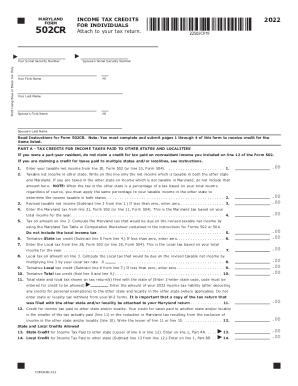
T Name MI Your Last Name Spouse's First Name MI Spouse's Last Name Read Instructions for Form 502CR. Note: You must complete and submit pages 1 through 4 of this form to receive credit for the items listed. PART A - TAX CREDITS FOR INCOME TAXES PAID TO OTHER STATES AND LOCALITIES If you were a part-year resident, do not claim a credit for tax paid on nonresident income you included on line 12 of the Form 502. If you are claiming a credit for taxes paid to multiple states and/or localit.

How it works

  1. Open form

    Open form follow the instructions

  2. Easily sign form

    Easily sign the form with your finger

  3. Share form

    Send filled & signed form or save

How to fill out the MD Form 502CR online

Filling out the MD Form 502CR is an essential step for Maryland residents seeking to claim personal income tax credits. This guide provides clear, step-by-step instructions to help users complete the form accurately and efficiently online.

Follow the steps to fill out the MD Form 502CR online.

  1. Click the ‘Get Form’ button to access the MD Form 502CR and open it in the editor.
  2. Begin by entering your Social Security number and the Social Security number of your spouse if applicable.
  3. Fill in your first and last name, as well as your spouse's first and last name, if you are filing jointly.
  4. Read the instructions carefully before proceeding to Part A, which details tax credits for income taxes paid to other states and localities.
  5. In Part A, provide your taxable net income and the taxable net income from the other state. Ensure to include only the amounts taxable in both states.
  6. Calculate the revised taxable net income by subtracting the taxable net income in the other state from your Maryland taxable net income.
  7. Complete lines related to the state tax as guided, computing local tax where applicable. Remember to enter the local tax amount based on revised taxable net income.
  8. Continue filling out the remaining parts of the form, such as Part B which addresses credits for child and dependent care expenses.
  9. After completing all parts of the form, review all entries for accuracy and ensure all required documentation is attached based on the instructions.
  10. Finally, save your changes, download the completed form, and proceed to print or share it as needed.

Start filling out the MD Form 502CR online today to ensure you claim the credits you deserve.

Get form

Experience a faster way to fill out and sign forms on the web. Access the most extensive library of templates available.
Get form

Related content

502CR - Marylandtaxes.gov
You must file Form. 500CR electronically to claim a business income tax credit other than...
Learn more
Individual Tax Forms and Instructions...
We offer several ways for you to obtain Maryland tax forms, booklets and instructions:...
Learn more
TaxYear 2013 502_502B 502B 502 - UserManual.wiki
Total additions to Maryland income (Add lines 2 through 5.) . ... income tax credits for...
Learn more

Related links form

Asq 9 Months F103 Traineeship Application Form Sevis Transfer Form University Of Cumberlands Medication Authorization Form Changes Accepted - Kingsschools

Questions & Answers

Get answers to your most pressing questions about US Legal Forms API.

Contact support

Generally, you are required to file a Maryland income tax return if: You are or were a Maryland resident; You are required to file a federal income tax return; and. Your Maryland gross income equals or exceeds the level listed below for your filing status.

Transfer the amount of child or dependent care expenses (not the federal tax credit) claimed on the federal form to line 9 of Maryland Form 502. You can subtract actual expenses up to the legal maximums of $3,000 for one child or $6,000 for two or more children.

If you are a nonresident, you must file Form 505 and Form 505NR. If you are a nonresident and need to amend your return, you must file Form 505X. If you are a nonresident employed in Maryland but living in a jurisdiction that levies a local income or earnings tax on Maryland residents, you must file Form 515.

Purpose Maryland Form 500CR is used to claim the following business tax credits against corporation and individual income tax. Tax Credit. Part. Aerospace, Electronics, or Defense Contract Tax. Credit**

Maryland nonresident The nonresident tax (5.75% + 1.75%) must be paid on their behalf in the same manner as individuals.

The Senior Tax Credit is available to homeowners at least 65 for whom the property is their principal residence (see the HOTC page for details); Interested homeowners must submit the Homeowners Tax Credit Application to the Maryland State Department of Assessments and Taxation (SDAT).

Place Form PV with attached check/money order on TOP of Form 502 and mail to: Comptroller of Maryland Payment Processing PO Box 8888 Annapolis, MD 21401-8888 DIRECT DEPOSIT OF REFUND (See Instruction 22.)

To claim a credit for taxes paid to the other state, and/or local jurisdiction in the other state, complete Form 502CR and attach it and a copy of the other state's nonresident income tax return (not just your W-2 Form) and, if applicable, the local jurisdiction's nonresident income tax return to your Maryland return.

Get This Form Now!

Use professional pre-built templates to fill in and sign documents online faster. Get access to thousands of forms.
Get form
If you believe that this page should be taken down, please follow our DMCA take down processhere.
Get MD Form 502CR
Get form
  • Adoption
  • Bankruptcy
  • Contractors
  • Divorce
  • Home Sales
  • Employment
  • Identity Theft
  • Incorporation
  • Landlord Tenant
  • Living Trust
  • Name Change
  • Personal Planning
  • Small Business
  • Wills & Estates
  • Packages A-Z
  • Affidavits
  • Bankruptcy
  • Bill of Sale
  • Corporate - LLC
  • Divorce
  • Employment
  • Identity Theft
  • Internet Technology
  • Landlord Tenant
  • Living Wills
  • Name Change
  • Power of Attorney
  • Real Estate
  • Small Estates
  • Wills
  • All Forms
  • Forms A-Z
  • Form Library
  • Legal Hub
  • About Us
  • Help Portal
  • Legal Resources
  • Blog
  • Affiliates
  • Contact Us
  • Delete My Account
  • Site Map
  • Industries
  • Forms in Spanish
  • Localized Forms
  • State-specific Forms
  • Forms Kit
  • Real Estate Handbook
  • All Guides
  • Notarize
  • Incorporation services
  • For Consumers
  • For Small Business
  • For Attorneys
  • USLegal
  • FormsPass
  • pdfFiller
  • signNow
  • altaFlow
  • DocHub
  • Instapage
Form Packages
  • Adoption
  • Bankruptcy
  • Contractors
  • Divorce
  • Home Sales
  • Employment
  • Identity Theft
  • Incorporation
  • Landlord Tenant
  • Living Trust
  • Name Change
  • Personal Planning
  • Small Business
  • Wills & Estates
  • Packages A-Z
Form Categories
  • Affidavits
  • Bankruptcy
  • Bill of Sale
  • Corporate - LLC
  • Divorce
  • Employment
  • Identity Theft
  • Internet Technology
  • Landlord Tenant
  • Living Wills
  • Name Change
  • Power of Attorney
  • Real Estate
  • Small Estates
  • Wills
  • All Forms
  • Forms A-Z
  • Form Library
Customer Service
  • Legal Hub
  • About Us
  • Help Portal
  • Legal Resources
  • Blog
  • Affiliates
  • Contact Us
  • Delete My Account
  • Site Map
  • Industries
  • Forms in Spanish
  • Localized Forms
  • State-specific Forms
  • Forms Kit
Legal Guides
  • Real Estate Handbook
  • All Guides
Prepared for you
  • Notarize
  • Incorporation services
Our Customers
  • For Consumers
  • For Small Business
  • For Attorneys
Our Sites
  • USLegal
  • FormsPass
  • pdfFiller
  • signNow
  • altaFlow
  • DocHub
  • Instapage
Social Media
Call us now toll free:
+1 833 426 79 33
As seen in:
© Copyright 1999-2026 airSlate Legal Forms, Inc. 3720 Flowood Dr, Flowood, Mississippi 39232
  • Your Privacy Choices
  • Terms of Service
  • Privacy Notice
  • Content Takedown Policy
  • Bug Bounty Program