Loading
Get Ri Dot Ri-1040 2022-2026
How it works
-

Open form follow the instructions
-

Easily sign the form with your finger
-

Send filled & signed form or save
How to fill out the RI DoT RI-1040 online
Filing your Rhode Island individual income tax return using the RI DoT RI-1040 form can be straightforward with the right guidance. This comprehensive guide provides step-by-step instructions to assist you in completing the form online accurately and efficiently.
Follow the steps to successfully complete your online RI DoT RI-1040 form.
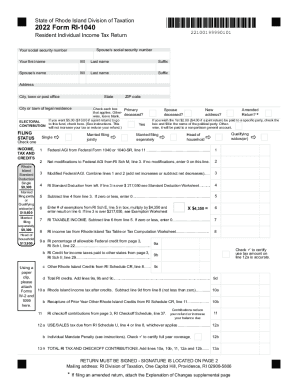
- Click ‘Get Form’ button to obtain the form and open it in the editor.
- Begin by entering your personal information in the designated fields, including your first name, middle initial, last name, and suffix. Make sure to also include your social security number and the spouse's information if applicable.
- Provide your current address, including the city, state, and ZIP code, ensuring the information is accurate and up to date.
- Select your filing status by checking the appropriate box that applies to you, whether you are single, married filing jointly, married filing separately, head of household, or a qualifying widow(er).
- Continue filling out your income information. Begin with the federal adjusted gross income from the federal form and any necessary modifications as required on the RI Schedule M.
- Calculate your Rhode Island standard deduction based on your filing status and enter the amount accordingly.
- Determine your total Rhode Island taxable income by subtracting the standard deduction from your modified federal adjusted gross income. Ensure to report zero if the result is negative.
- Calculate your Rhode Island income tax using the tax table or computation worksheet and enter the result.
- If applicable, list any credits you qualify for by completing the relevant sections including the allowable federal credit and other Rhode Island credits.
- Review your payments and any credits for property tax relief or other deductions you've qualified for, and calculate the total.
- Determine your amount due or overpaid, based on the calculations and previous payments to finalize your tax return.
- Ensure that you have signed the document in the designated area on page two, either as the taxpayer or preparer, and provide your contact information.
- Once all information is filled out and verified, proceed to save your changes, download, print, or share the form as needed.
Complete your RI DoT RI-1040 form online today to ensure your compliance with Rhode Island tax regulations.