Loading
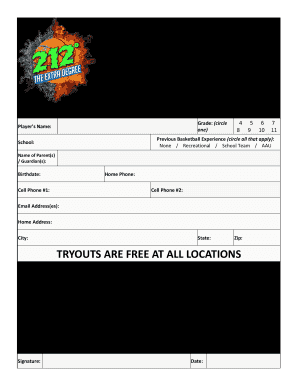
Get 212 Aau Basketball Team Tryouts Registration Form 2015-2026
How it works
-

Open form follow the instructions
-

Easily sign the form with your finger
-

Send filled & signed form or save
How to fill out the 212 AAU Basketball Team Tryouts Registration Form online
This guide will walk you through the process of completing the 212 AAU Basketball Team Tryouts Registration Form online. We aim to provide clear instructions to ensure a smooth and efficient registration experience for all participants.
Follow the steps to successfully fill out your registration form.
- Click the ‘Get Form’ button to access the registration form and open it for completion.
- Begin by selecting your player’s grade by circling one of the options provided (4, 5, 6, 7, 8, 9, 10, 11).
- In the next field, enter the player’s name as it appears on their official documents.
- Provide details about the player’s previous basketball experience by circling all applicable options: None, Recreational, School Team, or AAU.
- Fill in the name of the school the player is currently attending.
- Enter the names of the parent(s) or guardian(s) associated with the player.
- Input the player’s birthdate in the designated field.
- Provide the home phone number followed by the first and second cell phone numbers as required.
- Input the email address(es) associated with the player or their guardian.
- Fill in the home address, including the city, state, and zip code.
- Review the waiver regarding risks associated with participation in the program, ensuring to read it carefully.
- The undersigned(s) must then sign and date the form in the specified place to acknowledge understanding and acceptance of the terms outlined.
- Once all fields are complete, save your changes, then choose to download, print, or share the form as needed.
Complete your registration form online and ensure your spot at the tryouts today!