Get Riverbend Authorization For Use Or Disclosure Of Medical Record Information (formerly 204-rg) 2016-2025
How it works
-

Open form follow the instructions
-

Easily sign the form with your finger
-

Send filled & signed form or save
How to use or fill out the RiverBend Authorization for Use or Disclosure of Medical Record Information (Formerly 204-RG) online
Filling out the RiverBend Authorization for Use or Disclosure of Medical Record Information form is a straightforward process that allows you to manage your medical records effectively. This guide provides clear, step-by-step instructions to assist you in completing the form online.
Follow the steps to complete your authorization form effectively.
- Click ‘Get Form’ button to access the authorization form and open it for filling.
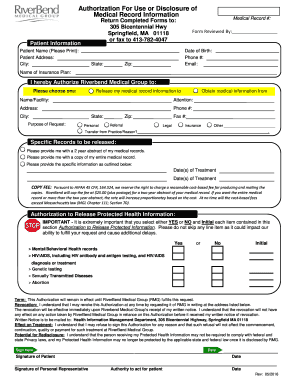
- In the 'Patient Information' section, enter your full name, address, city, state, zip, date of birth, phone number, email, and medical record number. Ensure all details are accurate.
- Identify the specific authorization by selecting either 'Release my medical record information to' or 'Obtain medical information from.' Fill in the name or facility, attention, address, phone number, city, state, and zip of the entity involved.
- Indicate the purpose of your request by marking the appropriate checkbox: 'Personal,' 'Referral,' 'Legal,' 'Insurance,' or 'Other' and specify if needed.
- Specify what records you want to be released by selecting one of the options: a two-year abstract, your entire medical record, or specific information with details such as the dates of treatment.
- Review the authorization to release protected health information section. You must select either 'YES' or 'NO' for each item listed, such as mental/behavioral health records and genetic testing, and provide your initials.
- Understand the terms regarding revocation and the effect on treatment. You have the right to revoke your authorization at any time in writing.
- Sign the form, indicating your signature, date, and the signature of any personal representative if applicable. Ensure that the authority to act for the patient is specified if someone else is signing.
- Once the form is fully completed, review all your entries for accuracy and completeness. Then, save your changes, download the form, or print it for submission.
Take control of your medical records by completing your authorization form online today.
Filling out an authorization to disclose health information requires you to specify who will receive your medical records and the purpose of the request. You'll also need to provide your personal information and details about what records you are authorizing to be shared. The RiverBend Authorization for Use or Disclosure of Medical Record Information (Formerly 204-RG) simplifies this process by outlining all necessary details clearly.
Industry-leading security and compliance
-
In businnes since 199725+ years providing professional legal documents.
-
Accredited businessGuarantees that a business meets BBB accreditation standards in the US and Canada.
-
Secured by BraintreeValidated Level 1 PCI DSS compliant payment gateway that accepts most major credit and debit card brands from across the globe.