Loading
Get Ny Phy 0738 2003-2026
How it works
-

Open form follow the instructions
-

Easily sign the form with your finger
-

Send filled & signed form or save
How to fill out the NY PHY 0738 online
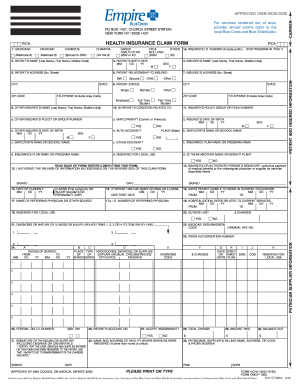
The NY PHY 0738 is an essential form for health insurance claims in New York. This guide will provide you with clear instructions to complete the form online, ensuring your claims are submitted accurately and efficiently.
Follow the steps to successfully complete your NY PHY 0738 online.
- Click ‘Get Form’ button to obtain the NY PHY 0738 form and open it in your preferred online editor.
- Begin filling out the form with the patient's information. Enter the patient's name, including their last name, first name, and middle initial in the designated fields.
- Fill in the patient's birth date using the MM/DD/YY format in the appropriate box.
- Provide the insured's name in a similar format with last name, first name, and middle initial. Include the relationship to the patient, selecting from options such as spouse or child.
- Enter the patient's address, including street number, city, state, and ZIP code.
- Detail the patient's status, selecting from options like single or married, and provide any additional necessary personal details.
- Indicate if the patient's condition is related to employment, auto accidents, or other insured policies by responding to the provided questions.
- Authorize the release of medical information by signing in the designated section, indicating the date of signature as well.
- Provide information about hospitalization dates related to the current services in the specified format.
- Complete the billing details with the total charges, any amount paid, and the balance due.
- Finally, review your entries for accuracy and save your changes. You may then choose to download, print, or share the completed form.
Start filling out your NY PHY 0738 online today to process your health insurance claims efficiently.