Loading
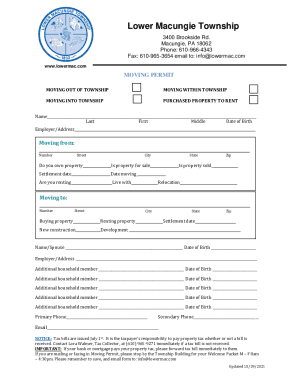
Get Pa Moving Permit - Lower Macungie Township 2021-2026
How it works
-

Open form follow the instructions
-

Easily sign the form with your finger
-

Send filled & signed form or save
How to fill out the PA Moving Permit - Lower Macungie Township online
Completing the PA Moving Permit for Lower Macungie Township online is a straightforward process that can be accomplished with careful attention to detail. This guide will walk you through each section of the form, ensuring you have the necessary information at hand to navigate the process efficiently.
Follow the steps to complete the moving permit online efficiently.
- Click ‘Get Form’ button to obtain the form and open it in the editor.
- Begin by selecting the appropriate moving options. Indicate if you are moving into, out of, or within the township, or if you have purchased property to rent.
- Fill in your personal information, including your name (last, first, middle), date of birth, and employer's address.
- Provide your current address by completing the fields for number, street, city, state, and zip code. Indicate whether you own the property, if it is for sale, and your settlement date.
- Answer questions regarding your moving situation, such as whether you are renting or living with someone, and provide your new address (number, street, city, state, zip code) where applicable.
- If applicable, list additional household members by providing their names and dates of birth.
- Enter your primary and secondary phone numbers as well as your email address for future communications.
- Review all entered information for accuracy. Once verified, save your changes. You have the option to download, print, or share the completed form as needed.
Ensure your moving process is smooth by filling out the PA Moving Permit online today.
Both zoning and building permits are required for sheds accessory to all other uses. Additional Notes: Additional permits may be required, such as electrical, mechanical or plumbing permits.