Loading
Get Ie Ulster Bank Uls96272ri 2018-2026
How it works
-

Open form follow the instructions
-

Easily sign the form with your finger
-

Send filled & signed form or save
How to fill out the IE Ulster Bank ULS96272RI online
The IE Ulster Bank ULS96272RI is a crucial form designed for individuals facing mortgage repayment difficulties. This guide provides a clear, step-by-step process to fill out the form online, ensuring you present your financial situation accurately and effectively.
Follow the steps to successfully complete the IE Ulster Bank ULS96272RI form.
- Click 'Get Form' button to access the document and open it in your selected online editor.
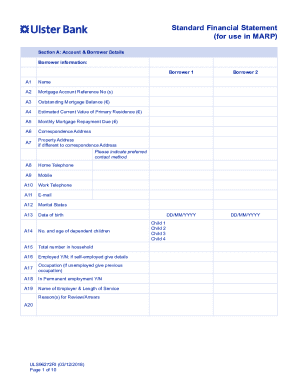
- Begin with Section A: Account & Borrower Details. Provide all required borrower information, such as name, mortgage account reference number, outstanding balance, current value of your primary residence, monthly repayment due, correspondence address, and preferred contact method.
- Next, indicate the marital status and provide the date of birth for each borrower. Include information about dependent children and household size, along with employment status and occupation details.
- Proceed to Section B: Your Monthly Income. Detail the gross and net monthly salary for both borrowers, listing any social welfare benefits and child benefits received. Include any other sources of monthly income.
- Move to Section C: Monthly Household Expenditure. List all household expenses including utilities, childcare, transport costs, mortgage-related costs, and medical expenses. Be thorough to accurately represent your monthly expenditures.
- In Section D: Your Current Monthly Debt Payments, provide information about your existing debts, including loans and credit obligations. Document the monthly payments and outstanding balances for clarity.
- Next, in Section E: Property Assets, provide details on non-primary residence assets and their estimated values. Additionally, include any income derived from these assets.
- Proceed to Section F: Non-Property Assets. List any other assets you may own, ensuring you provide relevant details to present a comprehensive overview of your financial situation.
- Finally, complete Section G: Financial Statement Summary, summarizing total income, expenditures, and any surplus or deficit. Review all information for accuracy before finalization.
- Once completed, save your changes, download your filled form, and print it if necessary before sharing it with your lender or designated support personnel.
Complete your documents online to ensure effective management of your financial situation.
Cessation of Branch Services On the 31st of March 2023, all Ulster Bank Ireland DAC branches ceased transactional services other than transactions to support with account closure requests. Ulster Bank services through An Post outlets ceased on 31st March 2023.