Loading
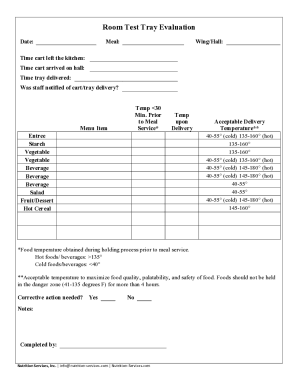
Get In Nutrition Services Room Test Tray Evaluation 2019-2026
How it works
-

Open form follow the instructions
-

Easily sign the form with your finger
-

Send filled & signed form or save
How to fill out the IN Nutrition Services Room Test Tray Evaluation online
The IN Nutrition Services Room Test Tray Evaluation is an essential tool for assessing meal service quality. This guide provides a clear and structured approach to filling out the evaluation form online, ensuring you gather and report accurate information effectively.
Follow the steps to complete the evaluation correctly.
- Press the ‘Get Form’ button to access the evaluation form and open it in your document editing tool.
- Fill in the 'Date' field with the appropriate date of the evaluation. This helps track the meal service over time.
- Enter the 'Meal' type being evaluated, such as breakfast, lunch, or dinner, to specify the context of the evaluation.
- Indicate the 'Wing/Hall' where the meal service took place. This information is vital for identifying the service area.
- Record the 'Time cart left the kitchen' to capture when the meal was prepared for delivery.
- Document the 'Time cart arrived on hall' to assess the duration of transportation.
- Note the 'Time tray delivered' to track the exact moment the meal reached its destination.
- Specify whether the staff was notified of the cart/tray delivery by selecting 'Yes' or 'No' as required.
- For each menu item listed, assess and fill in the 'Temp <30 Min. Prior to Meal Service' field to record the temperature before serving.
- Enter the 'Temp upon Delivery' for each menu item to ensure temperatures are within acceptable limits.
- Reference the acceptable delivery temperature ranges to determine if corrective action may be needed.
- Indicate whether 'Corrective action needed?' by checking 'Yes' or 'No' based on your evaluation.
- Utilize the 'Notes' section for any additional comments or observations that may be pertinent to the evaluation.
- Complete the form by filling in your name in the 'Completed by' field to validate who conducted the evaluation.
- Finally, save your changes to the document. You may also choose to download, print, or share the completed form as necessary.
Start filling out the IN Nutrition Services Room Test Tray Evaluation online today!