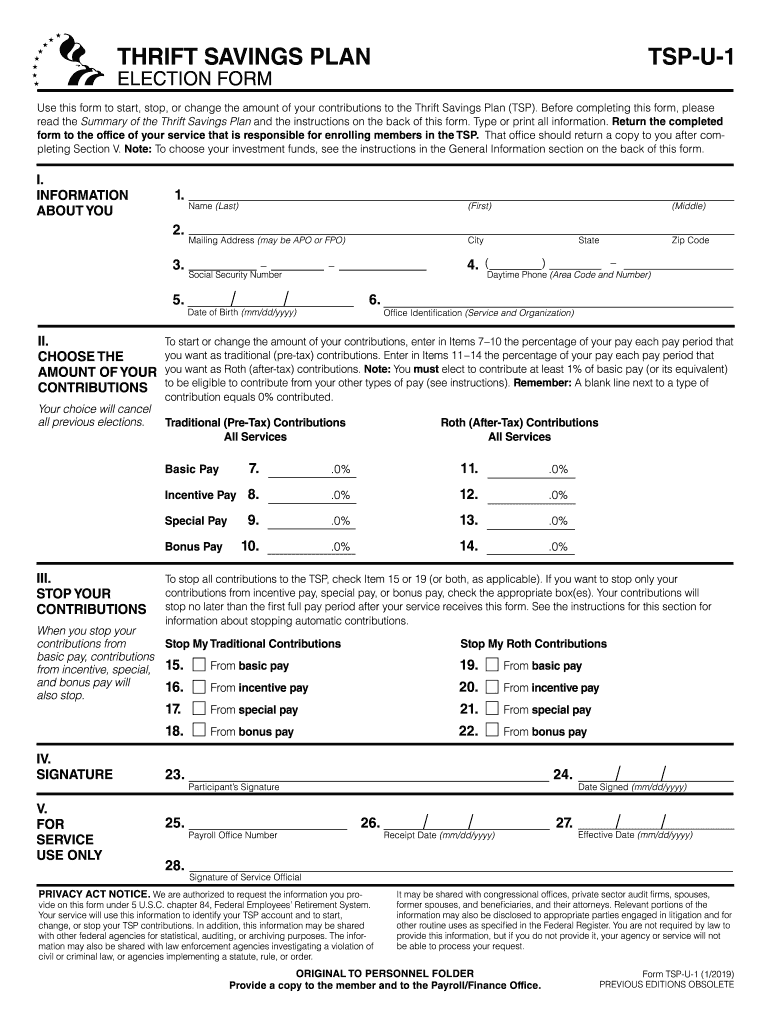
use this information to identify your TSP account and to start, change, or stop your TSP contributions. In addition, this information may be shared with other federal agencies for statistical, auditing, or archiving purposes. The information may also be shared with law enforcement agencies investigating a violation of civil or criminal law, or agencies implementing a statute, rule, or order. It may be shared with congressional offices, private sector audit firms, spouses, former spouses, and b.
Loading

Open form follow the instructions

Easily sign the form with your finger

Send filled & signed form or save
How to fill out the TSP-U-1 online
The TSP-U-1 form is essential for participants in the Thrift Savings Plan to manage their contributions effectively. This guide will provide clear and supportive instructions on how to complete the form online, step by step.
Follow the steps to successfully fill out the TSP-U-1 form.
- Press the ‘Get Form’ button to access the TSP-U-1 form and open it in your preferred online editor.
- In Section I, enter your personal information. Fill in your name, mailing address, social security number, daytime phone number, and date of birth clearly.
- Move to Section II to choose the amount of your contributions. Specify the percentage of your basic pay for traditional (pre-tax) and Roth (after-tax) contributions. Ensure that you indicate these percentages accurately to replace any previous elections.
- If you wish to stop your contributions, proceed to Section III. Indicate which types of contributions you want to cease by checking the appropriate boxes. Understand that stopping contributions from basic pay will also halt contributions from other types of pay.
- Complete Section IV by signing the form. This section ensures that you authorize the changes to your contributions.
- In Section V, ensure the 'Receipt Date' is filled out by the office responsible for TSP enrollment. The 'Effective Date' must not exceed the next full pay period.
- Review all entered information for accuracy, then save your changes. You may download, print, or share the completed form as needed.
Complete your TSP-U-1 form online today and take the next step in managing your retirement contributions.
Experience a faster way to fill out and sign forms on the web. Access the most extensive library of templates available.
Related content
Use this form to start, stop, or change the amount of your contributions to the Thrift...
The traveling salesman problem (TSP) is perhaps the best-known, and certainly one of the...
Selecione um respirador motorizado com peça facial inteira, capuz ou capacete, utilizando...
Get answers to your most pressing questions about US Legal Forms API.
How do I maximize my TSP contributions in 2020?
If you would like to maximize your contributions for 2020, enter your myPay election between December 8 December 14, 2019, and your election should be effective on December 22, the first pay period for 2020. Be certain to enter the amount you want withheld from your pay each pay period.
Can you transfer TSP to IRA?
If you decide to roll over your TSP assets to an IRA, you can choose either a traditional IRA or Roth IRA. No taxes are due if you roll over assets from a traditional TSP account to a traditional IRA, or if you roll over your contributions and earnings from a Roth TSP account to a Roth IRA.
Can I make a lump sum contribution to TSP?
Your contributions to the Thrift Savings Plan must be made by payroll deduction; you cannot contribute a lump sum. ... If you are not able to max out your TSP contributions, increase your contributions to the full amount and add Aunt Bertha's money to your budget to plug the gap caused by your increased TSP contributions.
Can you make a one time contribution to TSP?
No you can't. All TSP contributions must come from payroll deduction or from rollovers from qualified plans. ... If you are fully funding the TSP, you can contribute to an Individual Retirement Arrangement (IRA) as long as you have earned income.
How can I transfer my IRA without penalty?
You can move the funds from your existing IRA into another qualified plan, such as a 401(k) or a different IRA, then close your old IRA without incurring an early withdrawal penalty. The best way to move your funds is through a direct trustee-to-trustee transfer.
Can tsp be transferred?
A plan administrator (or trustee or custodian) can complete the transfer of a TSP participant's account based on the IRC's description of the TSP.
Does TSP allow after tax contributions?
The TSP is administered pursuant to a statute, the Federal Employees' Retirement System Act. Only Congress can authorize after-tax contributions to the TSP or expand the TSP's withdrawal options.
Should I rollover my TSP to an IRA?
Conclusion. It usually makes the most sense to keep your money in the TSP as long as you aren't withdrawing regularly. This way you can take advantage of the low investment fees in the TSP until the flexibility of an IRA becomes more practical.
How long does it take to withdraw money from TSP?
How long does it take to withdraw money from the Thrift Savings Plan (TSP)? It generally takes between 7 and 10 business days to process a TSP withdrawal request once it has been properly completed and submitted.
What is a TSP 99?
Withdrawal Request for Separated and Beneficiary Participants. Form TSP-99. Use this form to: Log in to My Account and access the online tool to request a withdrawal if you are either separated from service or a beneficiary participant. Withholding Certificate for Pension or Annuity Payments.
Use professional pre-built templates to fill in and sign documents online faster. Get access to thousands of forms.
If you believe that this page should be taken down, please follow our DMCA take down process here.