Loading
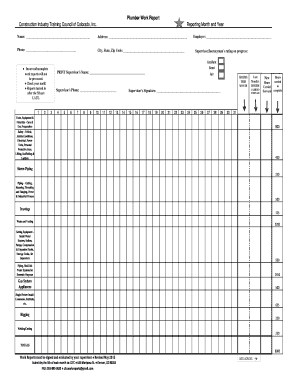
Get Co Construction Industry Training Council Plumber Work Report 2015-2026
How it works
-

Open form follow the instructions
-

Easily sign the form with your finger
-

Send filled & signed form or save
How to fill out the CO Construction Industry Training Council Plumber Work Report online
Filling out the CO Construction Industry Training Council Plumber Work Report is crucial for documenting the progress and work performed in the plumbing industry. This guide provides step-by-step instructions to ensure users complete the form accurately and efficiently.
Follow the steps to complete your Plumber Work Report with ease.
- Press the ‘Get Form’ button to access the Plumber Work Report and open it for completion.
- Begin filling out the ‘Reporting Month and Year’ section. Enter the month and year the work report pertains to, ensuring accuracy for timely evaluation.
- In the ‘Name’ field, input your full name as the person submitting the report. Make sure to use the correct spelling.
- Provide your complete address in the designated section, including city, state, and zip code.
- Enter your phone number for contact purposes. This will enable your supervisor or the council to reach you if necessary.
- For the ‘Employer’ field, list the name of the company or organization you are currently working for.
- The ‘Supervisor's Name’ should be printed as it appears in official documents. This is important for verification.
- Fill in the ‘Supervisor's Phone’ number to facilitate communication regarding the report.
- Complete the ‘Hours THIS MONTH’ section by entering the number of hours worked during the reporting month.
- Review the ‘Supervisor/Journeyman's rating on progress’ and select the appropriate rating (Excellent, Good, Fair) based on your work performance.
- Make sure to carry forward hours from the last month as indicated in the form. This helps in tracking your cumulative hours.
- In the section for ‘Tools, Equipment & Materials’, ensure you record the hours spent on care, preparation, and use correctly to reflect your activities.
- Fill in all relevant categories under ‘Safety’ practices you adhered to while on the job.
- Detail the hours worked on specific tasks such as ‘Storm Piping’, ‘Piping Cutting’, and so forth by entering the hours next to each activity.
- Once all fields are completed, ensure the report is signed and evaluated by your supervisor to validate the reported work.
- Before submission, check for any errors, ensure accurate math calculations, and verify that all sections are filled.
- Finally, save the completed form on your device. Options to download, print, or share the report may be available based on the platform used.
Complete your CO Construction Industry Training Council Plumber Work Report online today for seamless submission!