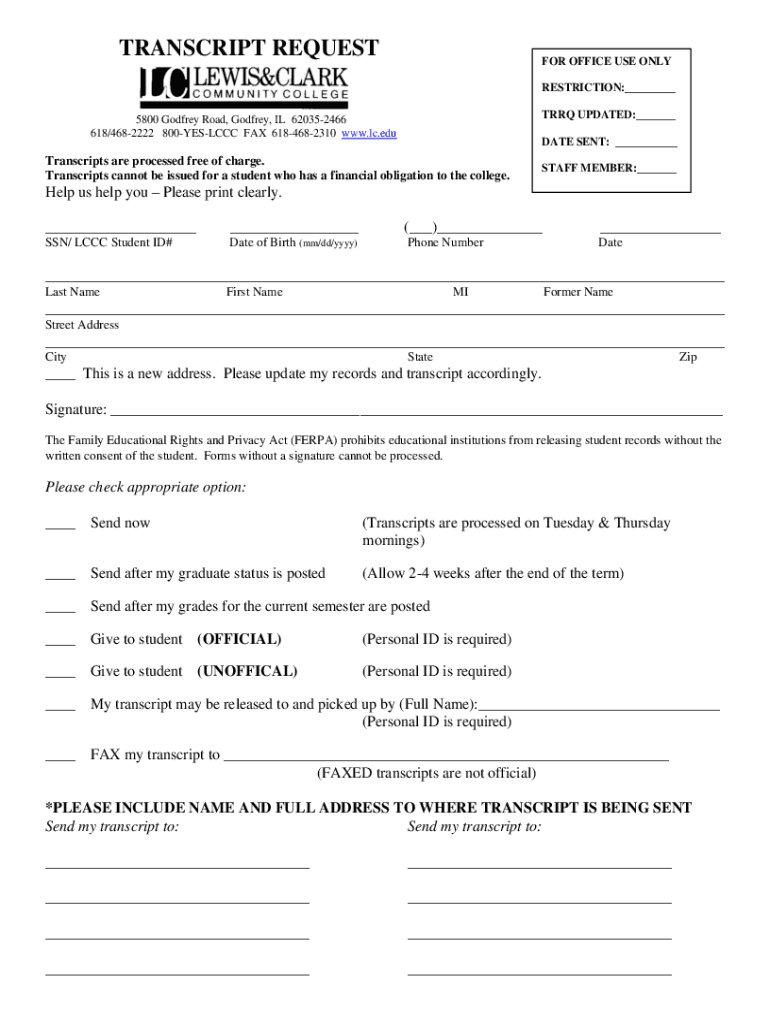
TRANSCRIPT REQUESTOR OFFICE USE ONLY RESTRICTION: RRQ UPDATED: 5800 Godfrey Road, Godfrey, IL 620352466 618/4682222 800YESLCCC FAX 6184682310 www.lc.eduDATE SENT: Transcripts are processed free of.
Loading

Open form follow the instructions

Easily sign the form with your finger

Send filled & signed form or save
How to fill out the Lewis And Clark Community College Transcript Request online
Filling out the Lewis And Clark Community College Transcript Request is a straightforward process that allows you to request your academic transcript efficiently. This guide provides step-by-step instructions to ensure you complete the form correctly and submit it without any issues.
Follow the steps to successfully complete your transcript request.
- Click ‘Get Form’ button to obtain the form and open it in the editor.
- Provide your personal information clearly. This includes your social security number or LCCC student ID, date of birth in mm/dd/yyyy format, phone number, and the date you are submitting the request.
- Fill in your last name, first name, middle initial, and any former name if applicable. Ensure all names are spelled correctly.
- Enter your street address, city, state, and zip code. If you have a new address, check the box to update your records accordingly.
- Sign the form to provide your consent as required by the Family Educational Rights and Privacy Act (FERPA). Ensure your signature is clear, as forms without a signature cannot be processed.
- Select the appropriate option for how you would like your transcript sent: 'Send now,' 'Send after my graduate status is posted,' 'Send after my grades for the current semester are posted,' or options for pickup by a student or others.
- If applicable, provide the name of the person authorized to pick up the transcript and their personal ID information.
- If you wish for your transcript to be faxed, include the fax number clearly, noting that faxed transcripts are not considered official.
- Complete the section indicating where you want your transcript sent, providing the name and full address to ensure accurate delivery.
- Once all fields have been filled out, review your entries for accuracy. Save your changes before submitting the form, or download, print, or share it as necessary.
Complete your transcript request online to ensure prompt processing of your academic records.
Experience a faster way to fill out and sign forms on the web. Access the most extensive library of templates available.
Related content
The Lewis and Clark County Records department is responsible for the recording, scanning...
Requests for more than ten official transcripts do require review and approval by the...
When this work is completed, the student should request a transcript to be mailed...
Get answers to your most pressing questions about US Legal Forms API.
How do I get my transcripts from Clark State Community college?
In addition to ordering online, you can submit a written request for transcripts in person during normal operating hours in our Records and Registration Office (Leffel Lane) or at our Beavercreek location. Transcript requests will not be accepted by fax or e-mail.
What is the least important year of high school?
Putting freshman grades in context. For colleges, the freshman year is typically the least important year on the high school transcript (they figure you're just trying to find the school every day).
Do colleges only look at junior year?
Colleges see all your grades, but they tend to look most at your junior and senior years.
Can I get my transcript online?
In most cases, you don't even have to call or go in person; the registrar's office may have an online form for requesting your transcript. You can usually pay the transcript fee online too. If the school does not offer such a form, you may need to download and print the right document, then send a check.
How do I get my unofficial transcript from LCCC?
Former students and alumni should contact the Student Hub via email (StudentHub@lccc.wy.edu) for assistance in requesting an unofficial transcript....Unofficial Transcripts Log in. Click on the Self-Service app. In Self-Service, click on Academics in the left navigation menu. Select the Unofficial Transcript link.
How important is junior year of high school?
Your academic performance as a high school junior has a significant impact on college applications. Your junior year transcript is the last complete set of coursework and grades that admissions officers review on your college applications, so it should showcase your academic strength.
How to get transcripts from Lewis and Clark Community college?
You can request a transcript in three different ways: Online - Request a Transcript (recommended). ... Fax - Download the request form and follow the instructions on the form. ... In Person - Fill out a transcript request form at the Enrollment Center or any CEC location.
How do I get my junior year transcript?
To obtain a transcript from a California public school, you will need to contact the school directly. If the school is closed, we suggest contacting the local school district or the County Office of Education for assistance. Contact information for these entities may be obtained from the California School Directory.
Use professional pre-built templates to fill in and sign documents online faster. Get access to thousands of forms.
If you believe that this page should be taken down, please follow our DMCA take down process here.