Loading
Get Nm Rpd-41379 2022-2026
How it works
-

Open form follow the instructions
-

Easily sign the form with your finger
-

Send filled & signed form or save
How to fill out the NM RPD-41379 online
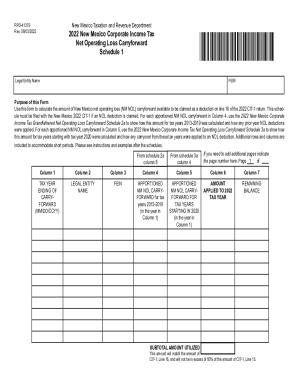
This guide provides detailed instructions on completing the NM RPD-41379 form for the 2022 New Mexico corporate income tax net operating loss carryforward. Users with varying levels of experience will find the step-by-step approach helpful in navigating the online filing process.
Follow the steps to accurately complete your NM RPD-41379 form online.
- Use the ‘Get Form’ button to obtain the NM RPD-41379 form and open it within your digital environment.
- Begin by entering your legal entity name in the designated field at the top of the form.
- Provide your Federal Employer Identification Number (FEIN) in the appropriate section following the legal entity name.
- Complete Schedule 1 by filling out the tax year ending for the carryforward in Column 1. Use the format MM/DD/CCYY.
- In Column 2, enter the legal entity name for each year listed under Column 1, ensuring accuracy in naming.
- Input the corresponding FEIN in Column 3 that matches the legal entity listed in Column 2.
- Fill in Column 4 with the apportioned NM NOL carryforward for tax years 2013-2019 relevant to each legal entity listed.
- In Column 5, indicate the apportioned NM NOL carryforward for tax years beginning in 2020.
- Enter the amount applied to the 2022 tax year in Column 6 as indicated on your calculations.
- Lastly, calculate the remaining balance in Column 7, which should be the total of Columns 4 and 5 minus Column 6, and ensure it matches the subtotal amount utilized accurately.
- After completing the form, be sure to save your changes, download for your records, print, or share as needed.
Complete your NM RPD-41379 form online with confidence and ensure your submissions are accurate.