Loading
Form preview
  • US Legal Forms
  • Other Templates
  • More Forms
  • More Multi-State Forms
  • Canada Waste Management Consent For Pre-authorized Payment Plan (pap) And Paperless Billing

Get Canada Waste Management Consent For Pre-authorized Payment Plan (pap) And Paperless Billing

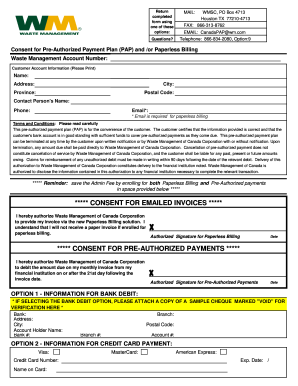
Return completed form using one of these options: Questions? MAIL: MSC, PO Box 4713 Houston TX 772104713 FAX: 8663138762 EMAIL: Canada PAP wm.com Telephone: 8668342080, Option:9 Consent for PreAuthorized.

How it works

  1. Open form

    Open form follow the instructions

  2. Easily sign form

    Easily sign the form with your finger

  3. Share form

    Send filled & signed form or save

How to fill out the Canada Waste Management Consent For Pre-Authorized Payment Plan (PAP) And Paperless Billing online

Filling out the Canada Waste Management Consent For Pre-Authorized Payment Plan (PAP) and Paperless Billing form online can streamline your billing process and ensure timely payments. This guide provides clear instructions to help you navigate each section of the form with confidence and ease.

Follow the steps to complete the form accurately and efficiently.

  1. Press the ‘Get Form’ button to access the consent form and open it in your preferred document editor.
  2. Begin by entering your Waste Management account number in the specified field to ensure your account is accurately identified.
  3. Proceed to fill in your customer account information. Clearly print your name, address, city, province, and postal code in the designated fields.
  4. Complete the contact person’s name, email, and phone number sections. Note that an email address is essential for paperless billing.
  5. Carefully read through the terms and conditions provided in the form. This informs you about your responsibilities and rights regarding the pre-authorized payment plan.
  6. If you choose paperless billing, sign and date the consent section for emailed invoices, acknowledging that you understand no paper invoice will be sent.
  7. Next, sign and date the section authorizing pre-authorized payments, allowing Waste Management to debit your account from your financial institution.
  8. Choose your preferred payment method: if you opt for bank debit, attach a voided check as verification and fill in your bank information. For credit card payments, provide the necessary credit card details.
  9. Once all fields are completed, review your entries for accuracy. Save changes to the document as needed.
  10. Finally, download, print, or share the completed form using your preferred method, ensuring it reaches Waste Management.

Take control of your waste management billing by completing the Canada Waste Management Consent Form online today!

Get form

Experience a faster way to fill out and sign forms on the web. Access the most extensive library of templates available.
Get form

Related content

CONTRACT MANAGEMENT PLAN - Hanford Site
The purpose of this Contract Management Plan (CMP) is to provide guidance to ... Payment...
Learn more
APPENDIX I: PLANNING PROCESS AND SOLID WASTE ...
A questionnaire was developed to solicit information on existing conditions, and on...
Learn more
Molina Medicaid Program Provider Manual
The Provider may request a prior authorization for clinically appropriate drugs that are...
Learn more

Related links form

Automotive Installer Co-Op Advertising Set-up Form Dermaplaning Waiver Form Replacement Window Measurement Worksheet Form 5564

Questions & Answers

Get answers to your most pressing questions about US Legal Forms API.

Contact support

A Pre-Authorized Payment (PAP) allows you to arrange automatic monthly payments from your TD Credit Card Account to pay a regularly recurring bill from a merchant.

You arrange to set up a PAP directly with the biller you want to pay by signing a written agreement. (A secure electronic signature that uniquely identifies you may be used to do so.)

Setting up a pre-authorized debit agreement It must be sent at least 3 days before the first withdrawal from your account and include the details of the agreement. You must provide your banking information as part of the pre-authorized debit agreement. Your financial institution may ask you to provide a blank cheque.

They are sometimes called direct debit, pre-authorized chequing (PAC), pre-authorized withdrawals or pre-authorized payments (PAPs). PADs are typically used for recurring payments, like mortgages and utilities, membership dues, charitable donations, RSP investments, and insurance premiums.

To set up a pre-authorized payment, you have to give the merchant permission to charge the amount each month to your credit card automatically. Agreement with merchant. To do this, you will need to sign an agreement (a contract) with the merchant. Bill to be taken from account.

Pre-authorized debits (PADs) are a convenient way to pay bills and make other payments automatically. Instead of sending a payment, a company withdraws funds from your bank account. It's a great way to pay bills like your mortgage, utilities, donations and insurance premiums.

Setting up a pre-authorized debit agreement Depending on the financial institution, you may be able to do this in writing, electronically or over the telephone. If you set up your agreement electronically or over the telephone, the bank should send you a written confirmation.

0:13 1:46 How To Set Up Pre-Authorized Bill Payments - YouTube YouTube Start of suggested clip End of suggested clip Account you'll also need the RBC institution number which is always zero zero three now to print aMoreAccount you'll also need the RBC institution number which is always zero zero three now to print a void check click on your checking. Account. Then click here to print your voice.

Get This Form Now!

Use professional pre-built templates to fill in and sign documents online faster. Get access to thousands of forms.
Get form
If you believe that this page should be taken down, please follow our DMCA take down processhere.
Get Canada Waste Management Consent For Pre-Authorized Payment Plan (PAP) And Paperless Billing
Get form
  • Adoption
  • Bankruptcy
  • Contractors
  • Divorce
  • Home Sales
  • Employment
  • Identity Theft
  • Incorporation
  • Landlord Tenant
  • Living Trust
  • Name Change
  • Personal Planning
  • Small Business
  • Wills & Estates
  • Packages A-Z
  • Affidavits
  • Bankruptcy
  • Bill of Sale
  • Corporate - LLC
  • Divorce
  • Employment
  • Identity Theft
  • Internet Technology
  • Landlord Tenant
  • Living Wills
  • Name Change
  • Power of Attorney
  • Real Estate
  • Small Estates
  • Wills
  • All Forms
  • Forms A-Z
  • Other Templates
  • Legal Hub
  • About Us
  • Help Portal
  • Legal Resources
  • Blog
  • Affiliates
  • Contact Us
  • Delete My Account
  • Site Map
  • Industries
  • Forms in Spanish
  • Localized Forms
  • State-specific Forms
  • Forms Kit
  • Real Estate Handbook
  • All Guides
  • Notarize
  • Incorporation services
  • For Consumers
  • For Small Business
  • For Attorneys
  • USLegal
  • FormsPass
  • pdfFiller
  • signNow
  • altaFlow
  • DocHub
  • Instapage
Form Packages
  • Adoption
  • Bankruptcy
  • Contractors
  • Divorce
  • Home Sales
  • Employment
  • Identity Theft
  • Incorporation
  • Landlord Tenant
  • Living Trust
  • Name Change
  • Personal Planning
  • Small Business
  • Wills & Estates
  • Packages A-Z
Form Categories
  • Affidavits
  • Bankruptcy
  • Bill of Sale
  • Corporate - LLC
  • Divorce
  • Employment
  • Identity Theft
  • Internet Technology
  • Landlord Tenant
  • Living Wills
  • Name Change
  • Power of Attorney
  • Real Estate
  • Small Estates
  • Wills
  • All Forms
  • Forms A-Z
  • Other Templates
Customer Service
  • Legal Hub
  • About Us
  • Help Portal
  • Legal Resources
  • Blog
  • Affiliates
  • Contact Us
  • Delete My Account
  • Site Map
  • Industries
  • Forms in Spanish
  • Localized Forms
  • State-specific Forms
  • Forms Kit
Legal Guides
  • Real Estate Handbook
  • All Guides
Prepared for you
  • Notarize
  • Incorporation services
Our Customers
  • For Consumers
  • For Small Business
  • For Attorneys
Our Sites
  • USLegal
  • FormsPass
  • pdfFiller
  • signNow
  • altaFlow
  • DocHub
  • Instapage
Social Media
Call us now toll free:
+1 833 426 79 33
As seen in:
© Copyright 1999-2026 airSlate Legal Forms, Inc. 17 Station Street, Ste. 203, Brookline, MA 02445
  • Your Privacy Choices
  • Terms of Service
  • Privacy Notice
  • Content Takedown Policy
  • Bug Bounty Program