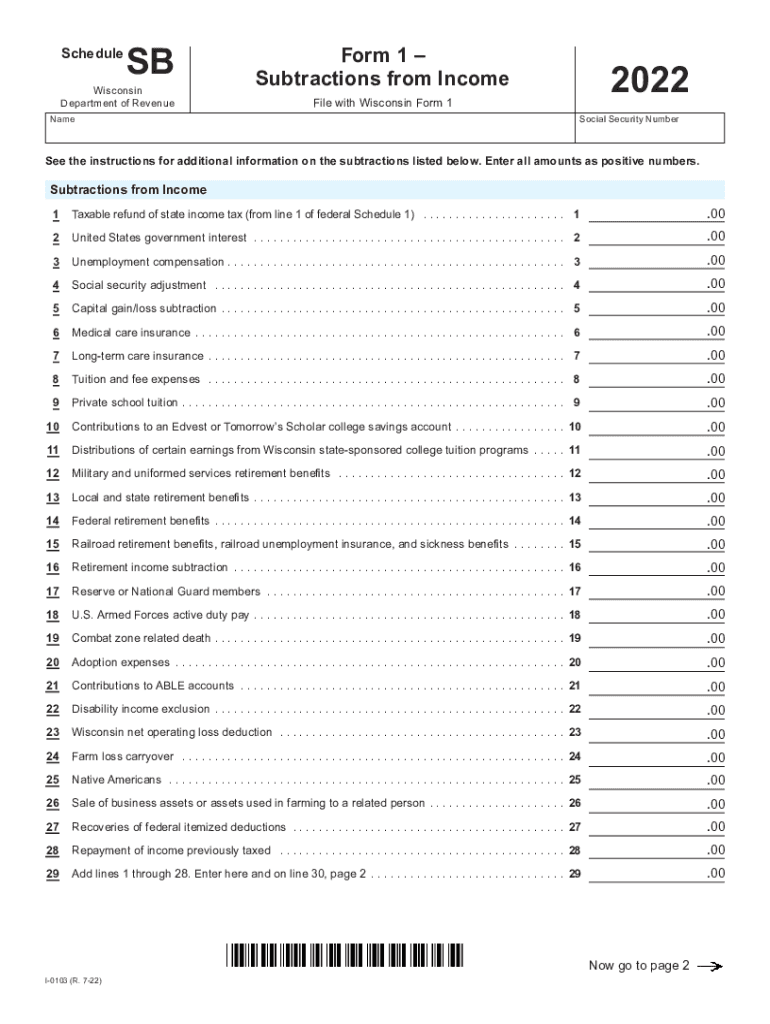
Tab to navigate within form. Use mouse to check applicable boxes, press space bar or press Enter. ScheduleSBWisconsin Department of Revenue NameSavePrintForm 1 Subtractions from IncomeClear2022File.
Loading

Open form follow the instructions

Easily sign the form with your finger

Send filled & signed form or save
How to fill out the WI I-0103 Schedule SB online
Filling out the WI I-0103 Schedule SB online is an essential task for individuals seeking to report subtractions from income in Wisconsin. This guide provides clear and supportive instructions to navigate each section of the form efficiently.
Follow the steps to successfully complete the WI I-0103 Schedule SB online.
- Press the ‘Get Form’ button to access the WI I-0103 Schedule SB and open it in your preferred online editor.
- In the first section of the form, you will need to enter your name and social security number. Ensure that this information is accurate to avoid processing delays.
- Proceed to list the subtractions from income. Begin with line 1, entering the taxable refund of state income tax. Continue this process through lines 1 to 29, providing the required amounts for each type of subtraction as indicated.
- Once all subtractions are listed, navigate to page 2 to continue entering information. Make sure to carefully follow the prompts for lines 30 to 50, entering appropriate amounts and ensuring accuracy.
- Upon completing all sections, review your entries for accuracy and completeness. You can then save your changes, download a copy of the completed form, or print it directly from the online tool.
Complete your WI I-0103 Schedule SB online today to ensure accurate reporting of your subtractions from income.
Experience a faster way to fill out and sign forms on the web. Access the most extensive library of templates available.
Related content
I-0103 (R. 7-22). Form 1 –. Subtractions from Income. 2022. Schedule SB ... 1 Taxable...
scheduled to start, we will postpone your coverage until the date you return to active...
6" diameter (or smaller) Schedule 40. PVC pipe cast or grouted into the floor or wall...
Get answers to your most pressing questions about US Legal Forms API.
What is Wisconsin Schedule I?
Make the election using Wisconsin Schedule I, Adjustments to Convert 2021 Federal Adjusted Gross Income and Itemized Deductions to the Amounts Allowable for Wisconsin. Example: For federal tax purposes you claim the credit under sec. 45E of the IRC for 50 percent of the startup costs of a small employer pension plan.
What tax bracket am I in Wisconsin?
What are the individual income tax rates? overbut not over2022 tax is$0$12,7603.54%$12,760$25,520$451.70 + 4.65%$25,520$280,950$1,045.04 + 5.3%$280,950$14,582.83 + 7.65%
What is Wisconsin tax schedule OS?
Schedule OS is used by individuals, estates, and trusts to compute the credit for net income tax paid to another state. For additional information on this credit, get Publication 125, Credit for Tax Paid to Another State, from any department office or our website at revenue.wi.gov.
What is Schedule SB on WI income tax?
What is Schedule SB in Wisconsin? Schedule SB is used to report differences between federal and Wisconsin income. These differences are called modifications and may affect the amount you report as a subtraction modification on line 4 of Form 1.
What is Wisconsin individual income tax?
How does Wisconsin's tax code compare? Wisconsin has a graduated individual income tax, with rates ranging from 3.54 percent to 7.65 percent. Wisconsin also has a flat 7.90 percent corporate income tax rate.
What is Wisconsin Schedule AD?
Schedule AD is used to report differences between federal and Wisconsin income. These differences are called modifications and may affect the amount you report as an addition modification on line 2 of Form 1.
Use professional pre-built templates to fill in and sign documents online faster. Get access to thousands of forms.
If you believe that this page should be taken down, please follow our DMCA take down process here.