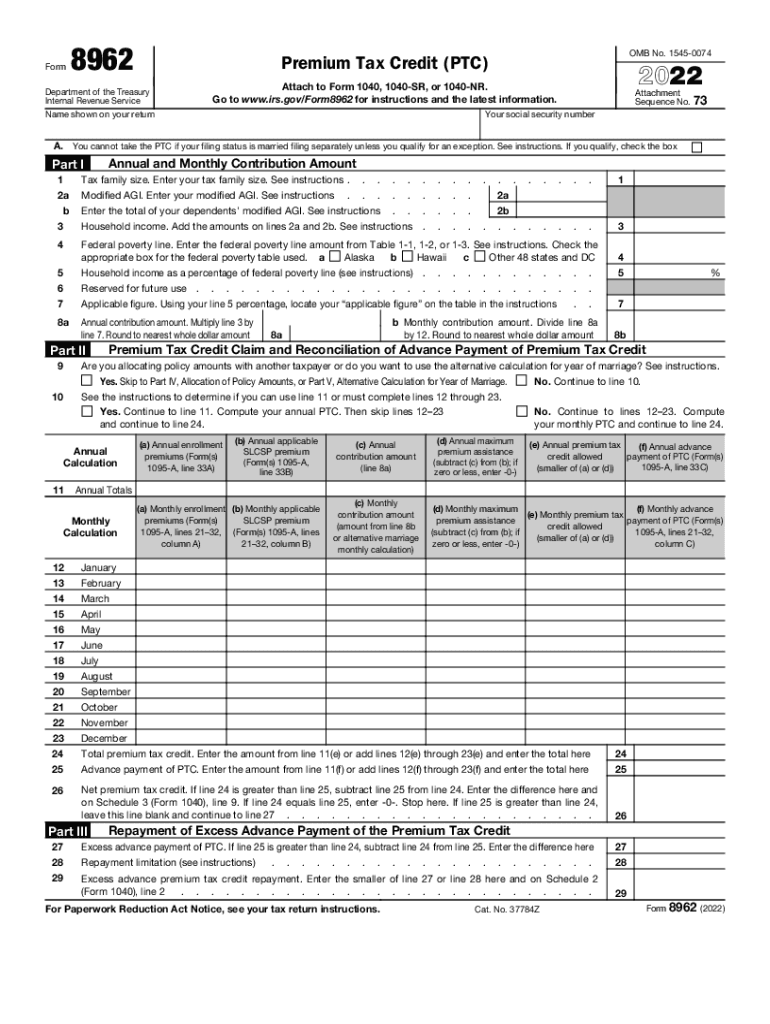
Form8962OMB No. 15450074Premium Tax Credit (PTC)Department of the Treasury Internal Revenue Service Name shown on your return2022Attach to Form 1040, 1040SR, or 1040NR. Go to www.irs.gov/Form8962.

Open form follow the instructions

Easily sign the form with your finger

Send filled & signed form or save
How to fill out the IRS 8962 online
Filling out the IRS Form 8962, used to claim the premium tax credit, can be a straightforward process when approached step by step. This guide will assist you in accurately completing the form online, ensuring you maximize your tax benefits.
Follow the steps to complete your form efficiently.
- Press the ‘Get Form’ button to access the IRS 8962 form and open it in your preferred digital editor.
- Enter your name as it appears on your tax return in the designated field at the top of the form.
- Provide your Social Security number in the corresponding field to verify your identity.
- In Part I, enter your tax family size in the section labeled 'Tax family size.' Next, calculate and input your modified adjusted gross income (AGI) into the designated spot.
- Add the modified AGIs of all dependents and enter the total to determine your household income. This figure is crucial for calculating your eligibility for the premium tax credit.
- Next, locate the federal poverty line amount from the relevant table and indicate the box corresponding to your state, whether it's Hawaii, Alaska, or the other 48 states and Washington, D.C.
- Based on your calculated household income, determine its percentage relative to the federal poverty line and input this figure.
- Refer to the instructions to find your applicable figure based on the percentage of the federal poverty line you've calculated.
- Multiply your household income by your applicable figure to find your annual contribution amount, and round it to the nearest dollar.
- Divide the annual contribution amount by 12 to find your monthly contribution amount, rounding as necessary.
- Proceed to Part II and determine if you are allocating policy amounts with another taxpayer or using the alternative calculation for the year of marriage. Select the appropriate option.
- If required, complete the annual and monthly calculations for your premium tax credit based on your enrollment premiums, maximum premium assistance, and applicable credits using the detailed sections provided in Part II.
- Calculate the net premium tax credit by comparing your total premium tax credit against any advance payments made.
- If applicable, fill out Part III regarding any excess advance payment of the premium tax credit, ensuring you adhere to the instructions provided.
- If you have multiple policy amounts to allocate, complete Part IV with the necessary allocation information for each policy, ensuring accuracy in your percentages.
- If choosing the alternative calculation for a year of marriage, follow the instructions in Part V to complete the necessary fields.
- Review all information entered for accuracy, then save your changes and download, print, or share the form as needed.
Complete your IRS Form 8962 online today to ensure you receive the premium tax credit you're entitled to.
Experience a faster way to fill out and sign forms on the web. Access the most extensive library of templates available.
Related content
Information about Form 8962, Premium Tax Credit, including recent updates, related forms...
If you did file your return with IRS Form 8962, sometimes the Failure to Reconcile notice...
Dec 15, 2016 — Form 8962 to your return to reconcile (compare) the advance payments with...
Get answers to your most pressing questions about US Legal Forms API.
What happens if I don't have form 8962?
In response to the rejection of an electronically filed return that's missing the Form 8962, individuals may refile a complete return by completing and attaching Form 8962 or a written explanation of the reasons for its absence.
Why am I being asked for form 8962?
If someone else enrolled a member of your family in Marketplace health insurance coverage with APTC and you claim the family member on your tax return, you are required to complete Form 8962 and attach it to your return.
How does form 8962 affect tax return?
To reconcile, you compare two amounts: the premium tax credit you used in advance during the year; and the amount of tax credit you qualify for based on your final income. You'll use IRS Form 8962 to do this. If you used more premium tax credit than you qualify for, you'll pay the difference with your federal taxes.
How do I know if I need to file form 8962?
If APTC was paid on your behalf, or if APTC was not paid on your behalf but you wish to take the PTC, you must file Form 8962 and attach it to your tax return (Form 1040, 1040-SR, or 1040-NR). At enrollment, the Marketplace may have referred to APTC as your “subsidy” or “tax credit” or “advance payment.”
How to find form 8962 premium tax credit?
Where Do I Get Form 8962? Form 8962 is available on the IRS website and is free to download. 5 If you're filing taxes using electronic tax filing software, this form should be generated for you as you navigate through the program's questionnaire format.
What is a form 8962 for IRS?
Purpose of Form Use Form 8962 to figure the amount of your premium tax credit (PTC) and reconcile it with advance payment of the premium tax credit (APTC).
How do I know if I need form 8962?
Form 8962 is a form you must file with your federal income tax return for a year if you received an advanced premium tax credit through the Marketplace during that year.
Why is TurboTax asking for form 8962?
Form 8962 for tax credits If you bought your health insurance from the Marketplace, you will file Form 8962 with your tax return. The ACA law includes a special Premium Tax Credit to help certain people pay the costs of health insurance, and Form 8962 relates to that credit.
What is form 8962 containing ACA explanation?
Form 8962 for tax credits If you bought your health insurance from the Marketplace, you will file Form 8962 with your tax return. The ACA law includes a special Premium Tax Credit to help certain people pay the costs of health insurance, and Form 8962 relates to that credit.
Use professional pre-built templates to fill in and sign documents online faster. Get access to thousands of forms.
If you believe that this page should be taken down, please follow our DMCA take down process here.