Loading
Get Nm Acd-31050 2022-2026
How it works
-

Open form follow the instructions
-

Easily sign the form with your finger
-

Send filled & signed form or save
How to fill out the NM ACD-31050 online
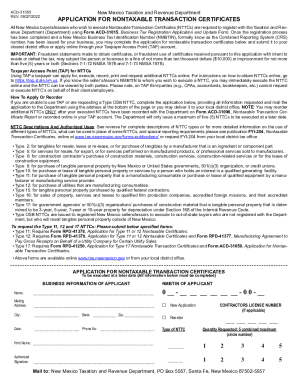
This guide provides a clear and structured approach to completing the NM ACD-31050 application for nontaxable transaction certificates online. By following these steps, users will understand how to complete each section and ensure their application is processed smoothly.
Follow the steps to fill out the NM ACD-31050 application carefully.
- Click the ‘Get Form’ button to access the NM ACD-31050 application and open it in the online editor.
- Begin by entering the business information of the applicant. Fill in the 'Name,' 'Mailing Address,' 'City,' 'State,' and 'Zip,' making sure all details are accurate.
- Provide the 'Date' and 'Phone Number' in the designated fields. Ensure that the contact information is up to date for potential follow-ups.
- Print your name clearly in the 'Print Name' section followed by your 'Authorized Signature' to validate the application.
- Enter the NMBTIN of the applicant in the specific format requested. This is crucial for processing your application.
- If applicable, provide your contractor's license number in the designated field or mark the appropriate selection if this does not apply to you.
- Select the type of NTTC you are applying for by circling the appropriate number. Be sure to request no more than five certificates combined.
- Review your form for accuracy and completeness to ensure all fields have been filled as required before proceeding.
- Once completed, you can choose to save your changes, download, or print the form right from the online editor. If needed, prepare to mail it to the address provided or submit it to your local district office.
Complete your NM ACD-31050 application online today to streamline your Nontaxable Transaction Certificate process.