Loading
Get Ut Limited Liability Company Registration Information Change Form 2017-2026
How it works
-

Open form follow the instructions
-

Easily sign the form with your finger
-

Send filled & signed form or save
How to fill out the UT Limited Liability Company Registration Information Change Form online
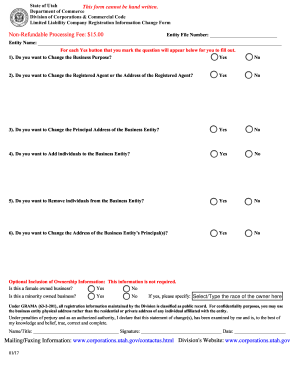
This guide provides clear, step-by-step instructions for completing the UT Limited Liability Company Registration Information Change Form online. Whether you are updating your business purpose or changing registered agents, this resource will help you navigate the form with ease.
Follow the steps to complete the form online:
- Press the ‘Get Form’ button to access the form and open it for editing.
- Enter your Entity File Number in the designated field. This is necessary to identify your business in the state of Utah.
- Type in the Entity Name as it appears on your registration. Ensure that you spell it correctly to avoid any processing issues.
- If you wish to change the Business Purpose, select 'Yes' and provide the new Business Purpose in the space provided.
- For changing the Registered Agent or their address, select 'Yes' and fill in the details of the new Registered Agent, along with the address. Remember, a valid Utah street address is required; PO Boxes can follow.
- If you are changing your Principal Address, indicate 'Yes' and provide the new address details as instructed.
- To add individuals to the business entity, choose 'Yes' and provide their names, positions, and addresses in the given spaces.
- If you need to remove individuals, select 'Yes' and list the names and positions of those to be removed.
- If changing the address of the business entity’s principals is necessary, select 'Yes' and detail the new information as requested.
- Consider whether to include optional ownership information about the business being female or minority-owned. Indicate 'Yes' or 'No' as applicable and provide additional details if necessary.
- Finally, print the form after completing all sections, and ensure to sign where indicated, entering your name, title, and date.
- Upon completion, save changes, download, print, or share the filled-out form as required.
Begin completing your documents online today!
To remove a member from an LLC in Utah, first refer to your operating agreement for the procedures to follow. You typically need a formal vote from the other members to approve the removal, then fill out the UT Limited Liability Company Registration Information Change Form. Submit this form to the state to update your LLC's records accordingly.