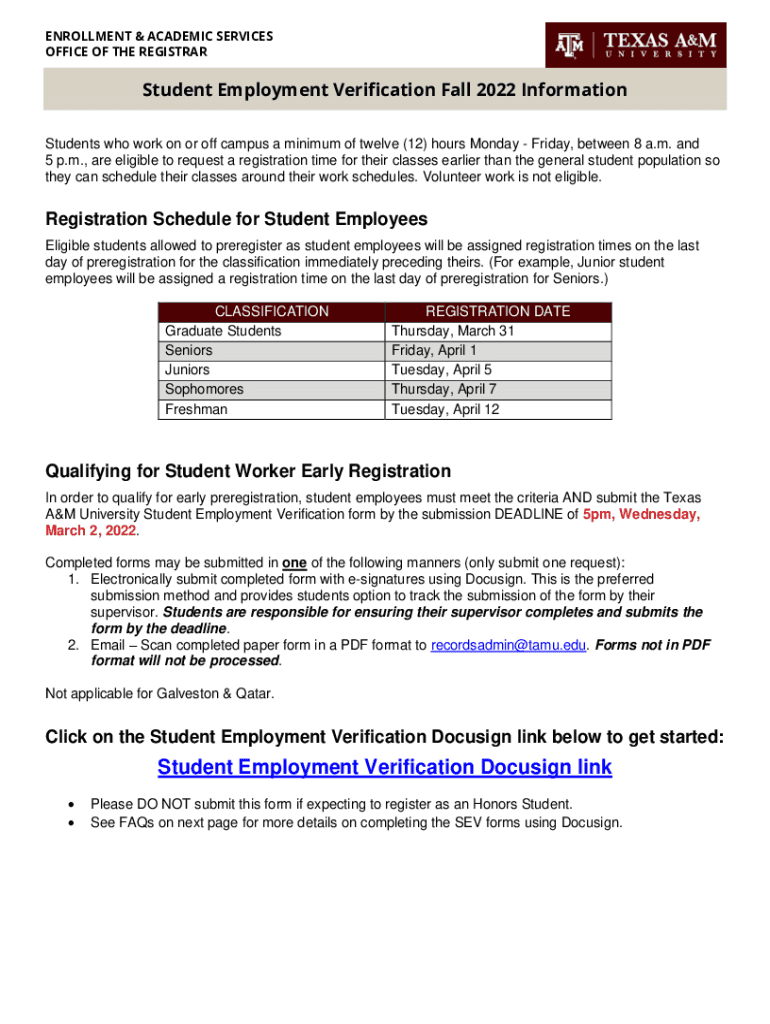
ENROLLMENT & ACADEMIC SERVICES OFFICE OF THE REGISTRARStudent Employment Verification Fall 2022 Information Students who work on or off campus a minimum of twelve (12) hours Monday Friday, between.
Loading

Open form follow the instructions

Easily sign the form with your finger

Send filled & signed form or save
How to fill out the TAMU Student Employment Verification online
The TAMU Student Employment Verification form is essential for students working on or off campus who wish to register for classes earlier due to their employment schedules. This guide provides a clear and structured approach to completing the form online, ensuring you meet the necessary requirements for early registration.
Follow the steps to complete the TAMU Student Employment Verification form online.
- Press the ‘Get Form’ button to access the Student Employment Verification form and open it in your editing tool.
- Upon accessing the form, your name and University Identification Number (UIN) will be automatically filled in. Review this information to ensure accuracy.
- Enter your supervisor's details: begin with the supervisor's name, followed by their email address, ensuring it is correct to facilitate the verification process.
- Specify your place of employment by entering the name of the business or organization where you are employed. It may be helpful to discuss this with your supervisor beforehand.
- Once you have completed the form, utilize the electronic signature feature for both you and your supervisor, if using Docusign. Ensure your supervisor e-signs it by submitting the request to their email.
- After submission, you and your supervisor will receive an email confirmation once the form is signed and routed to the Office of the Registrar for processing.
- If preferred, you may also print a paper version of the form, sign it manually, and then submit it via email in PDF format, ensuring it is submitted before the deadline.
- Finally, keep track of your submission status by following up with your supervisor and ensuring you receive the confirmation email.
Complete your Student Employment Verification form online to secure your early registration.
Experience a faster way to fill out and sign forms on the web. Access the most extensive library of templates available.
Related content
Employment as an instructor of an on-line class taken by students for college credit that...
Student Employment Verification Spring 2021 Information ... for early preregistration...
The Pennsylvania State University (Penn State or PSU) is a state-related public university...
Use professional pre-built templates to fill in and sign documents online faster. Get access to thousands of forms.
If you believe that this page should be taken down, please follow our DMCA take down process here.