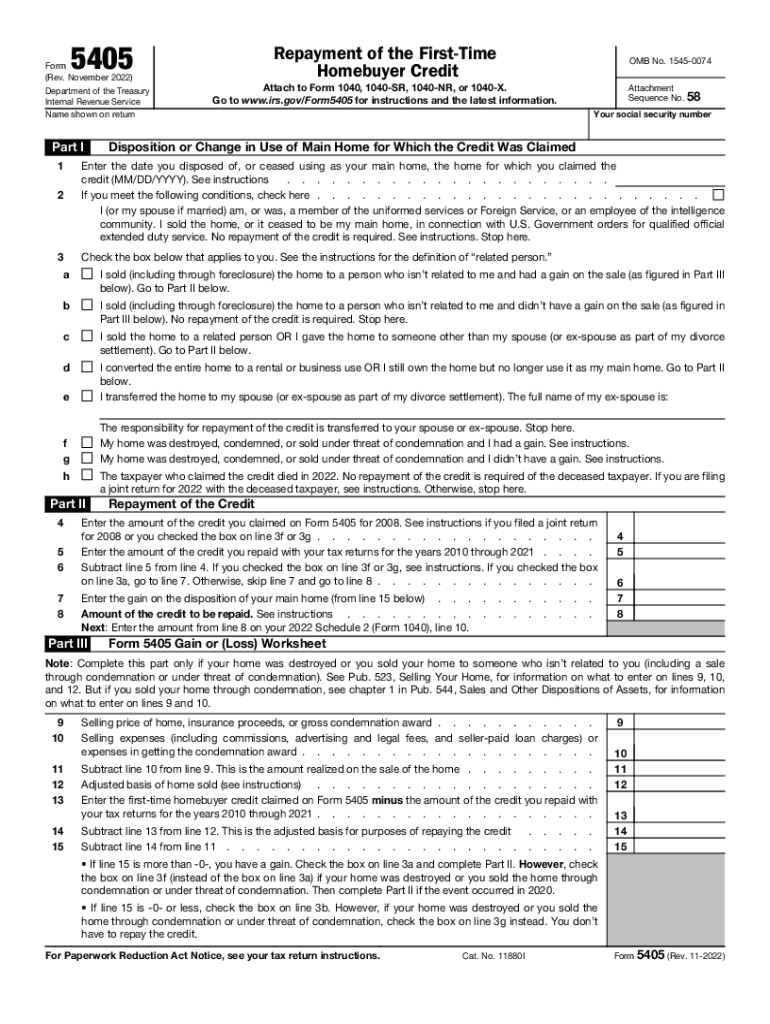
5405Form (Rev. November 2022)Department of the Treasury Internal Revenue Service Name shown on returner I 1Repayment of the First-time Homebuyer Credit OMB No. 15450074Attach to Form 1040, 1040SR,.
Loading

Open form follow the instructions

Easily sign the form with your finger

Send filled & signed form or save
How to fill out the IRS 5405 online
The IRS 5405 form is essential for individuals who need to repay the first-time homebuyer credit. This guide provides step-by-step instructions to assist users in completing the form online accurately and efficiently.
Follow the steps to successfully complete the IRS 5405 form online.
- Locate and click the ‘Get Form’ button to access the IRS 5405 online and open it in your preferred online document editor.
- Begin by entering your name as it appears on your tax return in the designated field. Ensure that you also include your social security number for identification purposes.
- In Part I, indicate the date when you sold or stopped using the home you previously claimed the credit for by entering the date in the format MM/DD/YYYY.
- If applicable, check the box provided if you or your spouse are a member of the uniformed services, indicating that no repayment is necessary.
- Select the appropriate checkbox that corresponds to your situation regarding the home sale. Options include selling to non-related individuals with or without gain or moving to rental use.
- In Part II, enter the amount of credit you claimed for 2008 in the appropriate field. This information is crucial for determining your repayment obligation.
- Fill in the amount of credit you have previously repaid for tax returns from 2010 to 2021. This will assist in calculating the remaining balance owed.
- Calculate the amount that is owed by subtracting the repayment from the credited amount and follow instructions for proceeding based on your property sale situation.
- In Part III, if you sold your home to a non-related person or experienced destruction, complete the Gain or (Loss) Worksheet by entering the selling price and expenses.
- Review all entered information for accuracy and correctness. Once you are satisfied, save your changes, and you may choose to download, print, or share the completed form.
Complete your IRS 5405 form online today to ensure compliance and ease of process.
Experience a faster way to fill out and sign forms on the web. Access the most extensive library of templates available.
Related content
Information about Form 5405, Repayment of the First-Time Homebuyer Credit, including...
For details about repaying the first-time homebuyer credit, see the Instructions for Form...
15 Dec 2016 — Low Income Taxpayer Clinics (LITCs) are independent from the IRS. ... Form...
Get answers to your most pressing questions about US Legal Forms API.
How do I know if I got the 2008 homebuyer credit?
You can tell if you took the credit by looking at the Form 1040 for 2008, 2009, and 2010. If you received the credit, you'll see an amount next to the first-time homebuyer credit on one of these 1040s. (In 2008, the credit was on line 69. In 2009 and 2010, the credit was on line 67.
Do I have to file Form 5405 every year?
You don't have to file Form 5405. Instead, enter the repayment on your 2022 Schedule 2 (Form 1040), line 10. requirement continues until the year in which the 2-year period ends. On the tax return for the year in which the 2-year period ends, you must include all remaining installments as an increase in tax.
How do I get my IRS Form 5405?
Go to .irs.gov/Form5405 for instructions and the latest information. 1 Enter the date you disposed of, or ceased using as your main home, the home for which you claimed the credit (MM/DD/YYYY).
What is federal Form 5405?
Use this form to: Notify the IRS that the home for which you claimed the credit was disposed of or ceased to be your main home. Figure the amount of the credit you must repay with your tax return.
Do you have to pay back 2008 homebuyer credit?
If you purchased your home in 2008: The credit is similar to a no-interest loan and must be repaid in 15 equal, annual installments that began in the 2010 income tax year. For example, if you bought a home in 2008 and claimed the maximum credit of $7,500, the repayment amount is $500 per year.
How to repay 2008 homebuyer credit?
General repayment rules for 2008 purchases. To repay the credit, you must increase your federal income taxes by 6⅔% (or 1/15) of the amount of the credit for each taxable year in the 15-year repayment period. The repayment period begins with the second taxable year following the year of qualifying home purchase.
What is Form 5405 used for?
Use this form to: Notify the IRS that the home for which you claimed the credit was disposed of or ceased to be your main home. Figure the amount of the credit you must repay with your tax return.
Use professional pre-built templates to fill in and sign documents online faster. Get access to thousands of forms.
If you believe that this page should be taken down, please follow our DMCA take down process here.