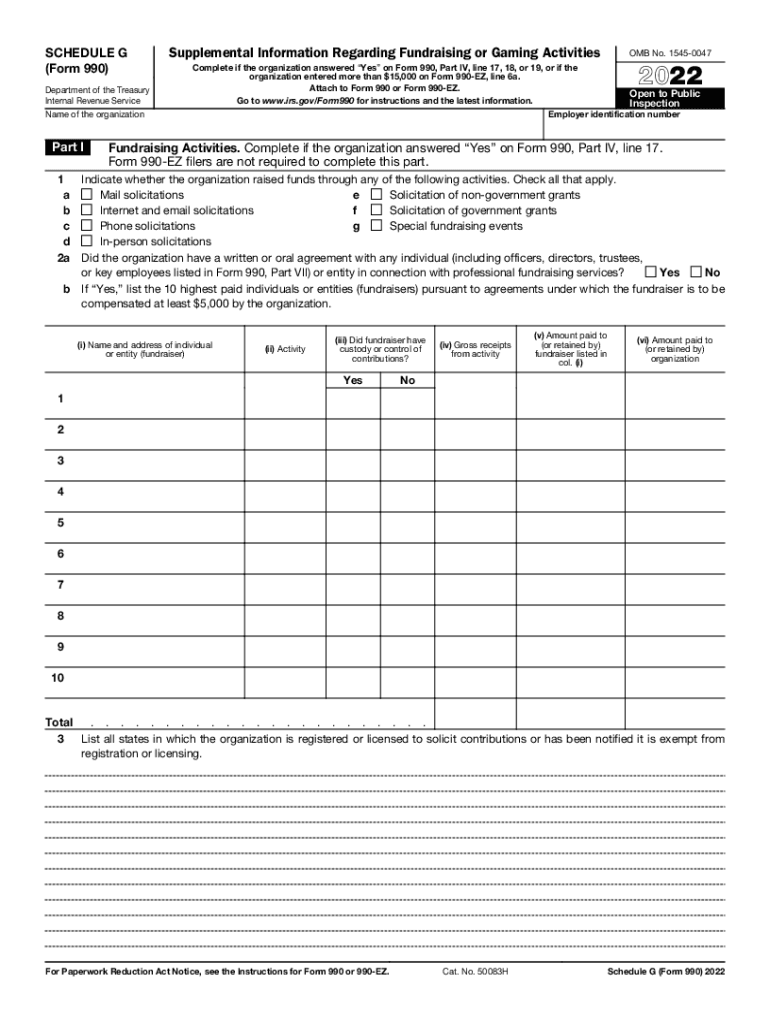
SCHEDULE G (Form 990) Department of the Treasury Internal Revenue ServiceSupplemental Information Regarding Fundraising or Gaming Activities Complete if the organization answered Yes on Form 990,.

Open form follow the instructions

Easily sign the form with your finger

Send filled & signed form or save
How to fill out the IRS 990 - Schedule G online
Filling out the IRS 990 - Schedule G can be an essential task for organizations engaged in fundraising or gaming activities. This guide provides clear, step-by-step instructions to help users navigate the process efficiently.
Follow the steps to fill out the form accurately.
- Click ‘Get Form’ button to access the IRS 990 - Schedule G and open it in your preferred editor.
- Begin by entering the employer identification number and the name of the organization at the top of the form.
- In Part I, indicate whether the organization raised funds through activities such as mail solicitations, internet solicitations, or phone solicitations by checking the appropriate boxes.
- For Question 2, specify if there was a written or oral agreement with any professional fundraiser. If 'Yes,' provide details for the ten highest-paid fundraisers, including their names, the activities they engaged in, and other required financial information.
- List all states where the organization is registered or exempt from registration under Question 3.
- Move to Part II and document gross receipts, contributions, and direct expenses for fundraising events. This section requires careful calculations to determine net income from events.
- If applicable, complete Part III focusing on gaming activities. Report gross revenue, direct expenses, and whether licenses for gaming activities were previously revoked or suspended.
- Before finalizing, review all entries for accuracy. Ensure all required fields are completed and information is clearly provided.
- Once completed, save your changes, and consider downloading, printing, or sharing the form as necessary.
Ensure compliance by filling out your documents correctly and submitting them online.
Experience a faster way to fill out and sign forms on the web. Access the most extensive library of templates available.
Related content
SCHEDULE G. (Form 990). 2022. Supplemental Information Regarding Fundraising or Gaming...
Information about Form 990-EZ and its instructions is at www.irs.gov/form990. ... a Gross...
Form 990-PF (2017). Page 2. Part II. Balance Sheets. Attached schedules and amounts in the...
Get answers to your most pressing questions about US Legal Forms API.
What are nontaxable benefits on a 990?
Nontaxable benefits are benefits specifically excluded from taxation under the Internal Revenue Code. Report the value of all nontaxable benefits provided to or for the benefit of the listed person, other than benefits disregarded for purposes of section 4958 under Regulations section 53.4958-4(a)(4).
What is 990 Schedule G Part II?
Part II of Schedule G requires information about the top two fundraising events (other than gaming) and all other fundraising events combined. The college or university completes Part II if it reported more than $15,000 for total special event revenue (including contributions from the event) for the year.
What are professional fundraising services on Form 990?
A professional fundraiser can deliver services during the tax year and be properly reported on line 2b but have no gross receipts to report in column (iv). For example, an organization may retain a fundraiser to conduct a feasibility study for a capital campaign.
What is Schedule G on 990?
Schedule G (Form 990) is used by an organization that files Form 990 or Form 990-EZ to report professional fundraising services, fundraising events, and gaming.
Is Schedule G required?
Nonprofits and tax-exempt organizations filing Form 990 and reporting total expenses of more than $15,000 for professional fundraising services on lines 6 and 11e in Part IX must file Schedule G along with the form. Nonprofit organizations filing Form 990-EZ aren't required to complete Part I.
What is Schedule G on tax returns?
Use Schedule G (Form 1120) to provide information applicable to certain entities, individuals, and estates that own, directly, 20% or more, or own, directly or indirectly, 50% or more of the total voting power of all classes of the corporation's stock entitled to vote. corporation's voting stock.
What is Schedule G on tax return?
Use Schedule G (Form 1120) to provide information applicable to certain entities, individuals, and estates that own, directly, 20% or more, or own, directly or indirectly, 50% or more of the total voting power of all classes of the corporation's stock entitled to vote.
Use professional pre-built templates to fill in and sign documents online faster. Get access to thousands of forms.
If you believe that this page should be taken down, please follow our DMCA take down process here.