Loading
Get Ks Rf-9 2019-2026
How it works
-

Open form follow the instructions
-

Easily sign the form with your finger
-

Send filled & signed form or save
How to fill out the KS RF-9 online
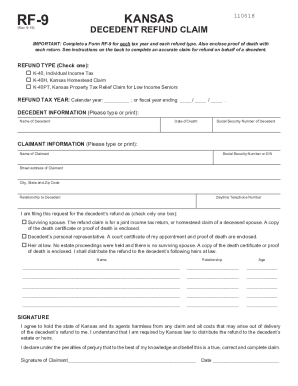
The KS RF-9 form is essential for claiming a tax refund on behalf of a deceased taxpayer. This guide provides a comprehensive overview and step-by-step instructions on how to accurately complete the form online, ensuring a smooth and efficient process for users.
Follow the steps to complete the KS RF-9 online
- Click ‘Get Form’ button to obtain the form and open it in the editor.
- Identify the refund type by checking the appropriate box for either K-40, K-40H, or K-40PT.
- Enter the refund tax year in the designated space, indicating either the calendar year or fiscal year ending date.
- In the decedent information section, type or print the full name of the decedent, the date of death in mm/dd/yyyy format, and the decedent's Social Security Number.
- In the claimant information section, provide your name, Social Security Number or EIN, street address, city, state, zip code, relationship to the decedent, and daytime telephone number.
- Select the appropriate box to indicate your role in filing the refund: as a personal representative or an heir at law. Attach the required documentation, such as proof of death.
- If filing as an heir at law, include the names, relationships, and ages of the decedent’s heirs at law. Use additional sheets if necessary.
- Review the statements at the bottom of the form, sign, and date the form to confirm the accuracy of your claim.
- After completing the form, save your changes. You may then download, print, or share the form as necessary.
Complete your KS RF-9 form online today to ensure timely processing of your refund.