Loading
Get Mi Harold F. Roth Patient Registration 2016-2026
How it works
-

Open form follow the instructions
-

Easily sign the form with your finger
-

Send filled & signed form or save
How to fill out the MI Harold F. Roth Patient Registration online
Filling out the MI Harold F. Roth Patient Registration form online is a straightforward process that ensures the accurate collection of vital patient information. This guide will provide you with step-by-step instructions to complete the form efficiently and correctly.
Follow the steps to complete your registration form online.
- Click ‘Get Form’ button to access the registration form and open it in your preferred editing environment.
- Begin by entering today's date in the designated field at the top of the form.
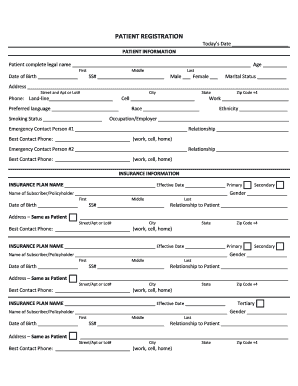
- Complete the PATIENT INFORMATION section by filling in the patient's complete legal name, age, and date of birth. Use the appropriate fields for the first, middle, and last names.
- Indicate the patient's social security number, gender, and marital status by selecting the appropriate options provided.
- Fill in the patient's address, including street and apartment or lot number, city, state, and zip code. Ensure that all contact numbers and preferred language are accurately listed.
- Complete additional fields regarding smoking status, race, ethnicity, and occupation/employer as required.
- Proceed to the EMERGENCY CONTACT section by providing the necessary details for two emergency contacts, including their names, relationships to the patient, and the best contact phone numbers.
- Next, complete the INSURANCE INFORMATION section. Fill in the insurance plan name, effective date, and details about the primary, secondary, or tertiary insurance policies as applicable.
- Provide the subscriber or policyholder details including their name, date of birth, social security number, and relationship to the patient.
- If the patient is a minor, complete the RESPONSIBLE PARTY INFORMATION section with details about the person responsible for payment. Fill in their complete information similarly as described in previous steps.
- Once all required fields are completed, review the information for accuracy. Save any changes made to the form, and utilize options to download, print, or share the completed document as needed.
Start filling out your MI Harold F. Roth Patient Registration form online now for a seamless healthcare experience.