Loading
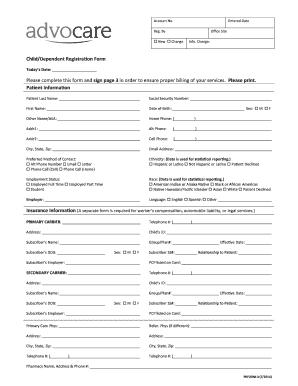
Get Nj Advocare Child/dependent Registration Form 2014-2026
How it works
-

Open form follow the instructions
-

Easily sign the form with your finger
-

Send filled & signed form or save
How to fill out the NJ Advocare Child/Dependent Registration Form online
This guide provides a structured approach to completing the NJ Advocare Child/Dependent Registration Form online. By following these instructions, you will ensure all necessary information is provided for proper billing and care management.
Follow the steps to successfully complete your registration form online.
- Press the ‘Get Form’ button to obtain the registration form and open it in your document editor.
- Begin by entering the current date in the 'Today's Date' field. This helps to keep track of your submission.
- In the 'Patient Information' section, fill in the patient’s last name, first name, and other names or aliases if applicable. Ensure you include the social security number and date of birth.
- Provide contact information by entering the home phone, alternate phone, and cell phone numbers. Include the full address, city, state, and zip code, along with an email address.
- Select the preferred method of contact from the available options, such as alternate phone number or email. This choice will inform the office how to communicate with you effectively.
- Complete the ethnicity and race sections by selecting the appropriate options. This information is used for reporting purposes.
- Fill out the employment status and language preferences for the patient, ensuring that you clearly outline the patient’s primary care physician and any referred physicians if different.
- Provide insurance information by listing the primary carrier's details, including the name, address, and phone number, along with the child's identification and subscriber’s information.
- If applicable, enter secondary insurance carrier information, following the same format as the primary carrier information.
- Fill in the guarantor information, including their name, relationship to the patient, contact details, and social security number.
- Input details for the other parent or guardian if applicable, and provide the emergency contact information.
- List all children or siblings associated with the patient, filling in their last names, first names, and dates of birth as required.
- Indicate how you heard about the practice by checking the appropriate option from the provided list.
- Finally, read through the 'Assignment of Benefits' and 'Use of Photograph' sections. Ensure you understand the terms before signing where indicated. Sign and date the form as required.
- Once all fields are completed and reviewed for accuracy, save your changes and proceed to download, print, or share the form if needed.
Complete your NJ Advocare Child/Dependent Registration Form online today for efficient healthcare management.