Loading
Get Ie Spcc2 2021-2026
How it works
-

Open form follow the instructions
-

Easily sign the form with your finger
-

Send filled & signed form or save
How to fill out the IE SPCC2 online
This guide provides comprehensive and user-friendly instructions on completing the IE SPCC2 form, which is essential for claiming the Single Person Child Carer Credit. By following these steps, users can ensure they accurately fill out the form and submit it correctly.
Follow the steps to successfully complete the IE SPCC2 online.
- Click ‘Get Form’ button to access the IE SPCC2 form and open it in your preferred editor.
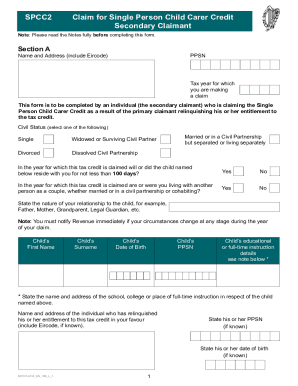
- Fill out Section A with your name, address (including Eircode), and your Personal Public Service Number (PPSN). Indicate the tax year for which you are claiming.
- Select your civil status from the provided options, such as 'Single', 'Married', 'Widowed or Surviving Civil Partner', etc.
- Answer whether the child named below resided with you for at least 100 days during the tax year by selecting 'Yes' or 'No'.
- Indicate if you were living with another person in a couple relationship during the year by selecting 'Yes' or 'No'.
- State your relationship to the child (e.g., Father, Mother, Grandparent, Legal Guardian).
- Provide the child's first name, surname, date of birth, and PPSN.
- Include details about the child's education or full-time instruction, specifying the name and address of the school or educational institution.
- Provide the name and address of the individual who is relinquishing their entitlement to the tax credit, along with their PPSN and date of birth if known.
- Fill in your bank details for any potential refunds, including IBAN and BIC codes. Ensure this information is accurate for prompt electronic payments.
- In Section B, confirm that you have read the notes by inserting 'T' in the designated box and sign the declaration, affirming the accuracy of your provided information.
- After completing the form, review all details for accuracy. Users can then save changes, download, print, or share the completed form as necessary.
Complete your IE SPCC2 form online to ensure a straightforward claiming process.