Loading
Form preview
  • US Legal Forms
  • Other Templates
  • Labor Forms
  • California Labor Forms
  • Ca Bls 3020 2016

Get Ca Bls 3020 2016-2026

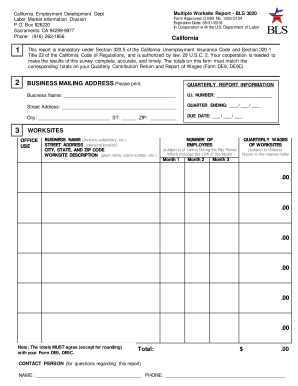
To State Unemployment Insurance laws, including the portion that exceeds the State’s taxable wage base. Round wages to the nearest dollar. • LARGE CHANGES: Use the space beside the worksite to explain any large changes in employment and/or wages. Changes might result from store closings, strikes, layoffs, bonuses, seasonal i ncreases or decreases, or similar events. • CLOSED OR SOLD: If a worksite has been sold, closed, or is otherwise inactive, use the space beside the worksite to show th.

How it works

  1. Open form

    Open form follow the instructions

  2. Easily sign form

    Easily sign the form with your finger

  3. Share form

    Send filled & signed form or save

How to fill out the CA BLS 3020 online

The CA BLS 3020, also known as the Multiple Worksite Report, is a crucial document required for businesses operating in California with multiple locations. This guide provides clear, step-by-step instructions to help users accurately complete the form online.

Follow the steps to complete the CA BLS 3020 form online.

  1. Click the ‘Get Form’ button to obtain the CA BLS 3020 and open it for editing.
  2. Review the business mailing address and ensure that all information is correct. This includes verifying the business name and the contact person's details.
  3. Locate the quarterly report information section. Fill in the business name, U.I. number, street address, quarter ending date, city, state, ZIP code, and due date. All fields must be completed accurately.
  4. Proceed to the worksites section. For each worksite listed, review the business name, street address, and its description. Make necessary corrections to each worksite's details if needed.
  5. Enter the number of employees per month for each worksite. This includes the total number of both full-time and part-time employees who worked or received pay during the pay period that includes the 12th of the month.
  6. Record the total wages for each worksite per quarter, ensuring that amounts are rounded to the nearest dollar. Include wages subject to State Unemployment Insurance laws.
  7. For significant changes in wages or employment (like store closings, strikes, or layoffs), provide explanations in the designated spaces beside each worksite.
  8. If any worksites are closed, sold, or inactive, document this information accordingly, including dates and any new owner details if applicable.
  9. Verify if all necessary worksites using the provided U.I. number are included. If there are additional worksites, add them with all required information as instructed.
  10. Complete the totals section by summing up employees and wages for all worksites for each reported month, ensuring these figures agree with the totals on your Quarterly Contribution Return.
  11. Finally, save your changes, download or print the completed form, and prepare to submit it to the designated agency.

Ensure your compliance and ease by completing the CA BLS 3020 online today.

Get form

Experience a faster way to fill out and sign forms on the web. Access the most extensive library of templates available.
Get form

Related content

Multiple Worksite Report - Frequently Asked...
The Multiple Worksite Report (MWR), also known as the BLS 3020 form, was developed by the...
Learn more
Article 6 - RECORDS, REPORTS AND CONTRIBUTION...
... (BLS 3020) · § 1088-9 - Reports with Respect to Employment and Payroll Distribution...
Learn more
UsersGuide v523.pdf
Animatics Corp. All rights reserved. Animatics SmartMotor™ Class 5 User's Guide. This...
Learn more

Related links form

Sample Nurse Practitioner Employment Contract 2020 OKLAHOMA CRIME FREE LEASE ADDENDUM - Cottonwood Ridge 2020 Van Start Nt2 Pdf 2020 Name Writing A Hypothesis Worksheet Remember To STEP 1 2020

Questions & Answers

Get answers to your most pressing questions about US Legal Forms API.

Contact support

The BLS multiple worksite report is mandatory for employers with multiple locations. This report helps the BLS gather comprehensive workforce data across different sites, ensuring accurate economic analysis. Filing the CA BLS 3020 alongside this report allows you to stay compliant and informed. Consider utilizing uslegalforms to streamline the reporting process and maintain compliance with all BLS requirements.

Yes, the CA BLS 3020 is mandatory for businesses that meet certain criteria. This form collects essential employment and wage information, which the government uses for statistical purposes. By completing this report, you fulfill your obligation and contribute to valuable economic data. For those facing challenges with the process, uslegalforms offers resources to simplify reporting.

Yes, you must respond to the Bureau of Labor Statistics survey if selected. Your participation in the CA BLS 3020 and other related surveys is crucial in providing accurate labor market data. By answering these surveys, you not only comply with legal obligations but also support national economic statistics. If you need assistance, platforms like uslegalforms can guide you through the reporting process.

Several BLS surveys are mandatory for specific sectors. Key among them is the CA BLS 3020, which assists in collecting vital employment statistics. Businesses must also participate in the Annual Refiling Survey and the Quarterly Census of Employment and Wages. Meeting these requirements ensures that you contribute valuable information to the labor statistics that affect economic planning.

BLS reporting is indeed mandatory for many businesses in the United States. This requirement includes businesses that need to comply with federal guidelines, ensuring accurate labor statistics. Submitting your CA BLS 3020 report helps create a clearer picture of the employment landscape. Failure to report can lead to penalties, so it's essential to stay compliant.

The multiple worksite report (MWR) is mandatory in several states, including California, where it plays a key role in data collection. Each state may have different requirements, so it's important to understand local regulations. For businesses operating in multiple states, ensuring compliance with CA BLS 3020 and similar requirements is essential to avoid confusion and penalties.

The primary purpose of the multiple worksite report is to collect comprehensive employment data from businesses with multiple locations. Through the CA BLS 3020, this report helps policymakers understand workforce trends and economic conditions. Ultimately, this information plays a crucial role in shaping labor policies and programs.

The multiple worksite report is used to provide detailed employment information for establishments in different locations. Specifically, the CA BLS 3020 captures job figures for each location, which aids in accurate labor market analysis. This data supports economic decision-making for both business owners and government agencies.

Yes, the multiple worksite report is mandatory in California for employers with multiple locations. This report, often referred to as the CA BLS 3020, helps state agencies gather accurate employment data. Failing to submit this report can result in penalties, making compliance essential for businesses operating in the state.

To file form SI 550 online, start by accessing the California Secretary of State's website, where the form is available. The CA BLS 3020 is important for maintaining your corporation's status, so ensure that you complete it accurately. The online platform is user-friendly, and it allows you to submit your form efficiently. For added convenience and assistance, uslegalforms can provide templates and guidance tailored to your needs.

Get This Form Now!

Use professional pre-built templates to fill in and sign documents online faster. Get access to thousands of forms.
Get form
If you believe that this page should be taken down, please follow our DMCA take down processhere.
Get CA BLS 3020
Get form
  • Adoption
  • Bankruptcy
  • Contractors
  • Divorce
  • Home Sales
  • Employment
  • Identity Theft
  • Incorporation
  • Landlord Tenant
  • Living Trust
  • Name Change
  • Personal Planning
  • Small Business
  • Wills & Estates
  • Packages A-Z
  • Affidavits
  • Bankruptcy
  • Bill of Sale
  • Corporate - LLC
  • Divorce
  • Employment
  • Identity Theft
  • Internet Technology
  • Landlord Tenant
  • Living Wills
  • Name Change
  • Power of Attorney
  • Real Estate
  • Small Estates
  • Wills
  • All Forms
  • Forms A-Z
  • Other Templates
  • Legal Hub
  • About Us
  • Help Portal
  • Legal Resources
  • Blog
  • Affiliates
  • Contact Us
  • Delete My Account
  • Site Map
  • Industries
  • Forms in Spanish
  • Localized Forms
  • State-specific Forms
  • Forms Kit
  • Real Estate Handbook
  • All Guides
  • Notarize
  • Incorporation services
  • For Consumers
  • For Small Business
  • For Attorneys
  • USLegal
  • FormsPass
  • pdfFiller
  • signNow
  • altaFlow
  • DocHub
  • Instapage
Form Packages
  • Adoption
  • Bankruptcy
  • Contractors
  • Divorce
  • Home Sales
  • Employment
  • Identity Theft
  • Incorporation
  • Landlord Tenant
  • Living Trust
  • Name Change
  • Personal Planning
  • Small Business
  • Wills & Estates
  • Packages A-Z
Form Categories
  • Affidavits
  • Bankruptcy
  • Bill of Sale
  • Corporate - LLC
  • Divorce
  • Employment
  • Identity Theft
  • Internet Technology
  • Landlord Tenant
  • Living Wills
  • Name Change
  • Power of Attorney
  • Real Estate
  • Small Estates
  • Wills
  • All Forms
  • Forms A-Z
  • Other Templates
Customer Service
  • Legal Hub
  • About Us
  • Help Portal
  • Legal Resources
  • Blog
  • Affiliates
  • Contact Us
  • Delete My Account
  • Site Map
  • Industries
  • Forms in Spanish
  • Localized Forms
  • State-specific Forms
  • Forms Kit
Legal Guides
  • Real Estate Handbook
  • All Guides
Prepared for you
  • Notarize
  • Incorporation services
Our Customers
  • For Consumers
  • For Small Business
  • For Attorneys
Our Sites
  • USLegal
  • FormsPass
  • pdfFiller
  • signNow
  • altaFlow
  • DocHub
  • Instapage
Social Media
Call us now toll free:
+1 833 426 79 33
As seen in:
© Copyright 1999-2026 airSlate Legal Forms, Inc. 17 Station Street, Suite 303, Brookline, MA 02445
  • Your Privacy Choices
  • Terms of Service
  • Privacy Notice
  • Content Takedown Policy
  • Bug Bounty Program