Loading
Get Mn M1w 2022-2026
How it works
-

Open form follow the instructions
-

Easily sign the form with your finger
-

Send filled & signed form or save
How to fill out the MN M1W online
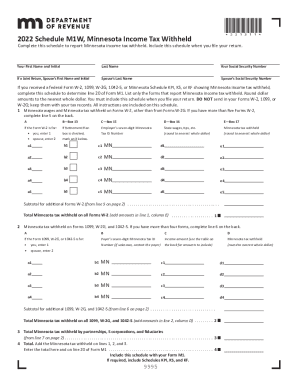
The MN M1W is a crucial schedule for reporting Minnesota income tax withheld. Completing this schedule accurately ensures that your tax return is processed correctly, leading to a smoother filing experience. This guide offers step-by-step instructions tailored for users of various experience levels.
Follow the steps to complete the MN M1W online.
- Click ‘Get Form’ button to obtain the MN M1W form and open it in your preferred online editor.
- Begin by entering your first name and initial in the designated fields at the top of the form. Follow this by providing your last name and Social Security Number.
- If you are filing a joint return, enter your spouse’s first name, initial, last name, and their Social Security Number in the respective sections.
- Locate the section that requires you to report Minnesota wages and tax withheld from your Forms W-2. Enter the total wages from Box 15 of each W-2 in Column C and the total Minnesota tax withheld from Box 17 in Column E.
- If you have more than five W-2 forms, complete line 5 on the back page of the schedule as instructed.
- Next, if applicable, report any tax withheld on Forms 1099, W-2G, and 1042-S in the provided sections. Enter relevant details such as payer’s Minnesota Tax ID and income amounts.
- If you received more than four of these additional forms, make sure to complete line 6 on the back of the form.
- Continue to fill out the section for total Minnesota tax withheld by partnerships, S corporations, and fiduciaries, if applicable. Ensure to provide all required data.
- Add the totals from all relevant sections and ensure they sum accurately. Enter the final total on line 4 and carry this total back to Form M1.
- Once all sections are complete, review your entries for accuracy. Save the changes, and then download or print your completed schedule.
Complete your forms online with ease and accuracy.