Loading
Get Mn Dor Schedule M1c 2022-2026
How it works
-

Open form follow the instructions
-

Easily sign the form with your finger
-

Send filled & signed form or save
How to fill out the MN DoR Schedule M1C online
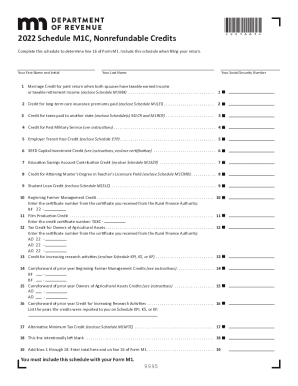
This guide provides detailed instructions on filling out the Minnesota Department of Revenue Schedule M1C form online. It aims to simplify the process for all users, including those with limited legal experience, by breaking down each section and field of the form.
Follow the steps to complete Schedule M1C efficiently.
- Press the ‘Get Form’ button to access the Schedule M1C form and open it in your preferred online editor.
- Enter your first name and initial in the designated field.
- Input your last name in the appropriate section.
- Provide your Social Security number, ensuring accuracy in the number entered.
- For line 1, determine if you qualify for the Marriage Credit. If eligible, enclose Schedule M1MA, then enter the credit amount.
- For line 2, if you paid premiums for a qualified long-term care insurance policy, enclose Schedule M1LTI and input the credit amount.
- If applicable, for line 3, enter the amount for taxes paid to another state and enclose the necessary Schedule(s) M1CR and M1RCR.
- On line 4, assess eligibility for the Credit for Past Military Service. Follow the instructions to calculate the credit amount.
- For line 5, if you purchase transit passes for employees, complete Schedule ETP and enter the credit here.
- If you qualify, enter the credit amount for line 6, the SEED Capital Investment Credit, including required certification.
- For line 7, if you contributed to an education savings account, complete Schedule M1529 and enter the credit here.
- Complete Schedule M1CMD if eligible for the Credit for Attaining Master’s Degree (line 8) and enter the credit on this line.
- For line 9, if you made qualifying student loan payments, complete Schedule M1SLC and enter the total credit amount.
- Enter your Beginning Farmer Management Credit on line 10, including the certificate number from the Rural Finance Authority.
- Provide certification numbers and amounts on lines 11 and 12 for relevant credits according to their specific requirements.
- If applicable, report any carryforward credits on lines 14 and 15.
- For the Alternative Minimum Tax Credit, complete Schedule M1MTC and enter the appropriate amount on line 17.
- Finally, total all amounts from lines 1 to 18 and enter this total on line 19. Ensure to include Schedule M1C with your Form M1.
Complete your documents online to ensure a smooth filing process.
More about the Minnesota Form M1C Tax Credit This form is for income earned in tax year 2021, with tax returns due in April 2022. We will update this page with a new version of the form for 2023 as soon as it is made available by the Minnesota government.