Loading
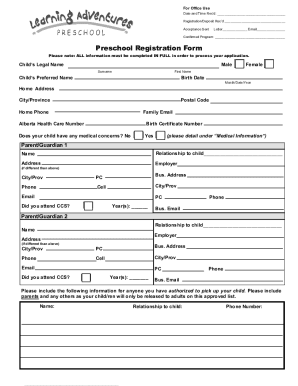
Get Or Learning Adventures Preschool Registration Form 2021-2026
How it works
-

Open form follow the instructions
-

Easily sign the form with your finger
-

Send filled & signed form or save
How to fill out the OR Learning Adventures Preschool Registration Form online
Filling out the OR Learning Adventures Preschool Registration Form online is a crucial step in enrolling your child in the program. This guide provides comprehensive, step-by-step instructions to help you complete the registration form accurately and efficiently.
Follow the steps to complete the registration form effortlessly.
- Press the ‘Get Form’ button to access the OR Learning Adventures Preschool Registration Form and open it for completion.
- Begin by entering your child's legal name, including their surname and first name. If your child has a preferred name, please include that as well. Ensure to provide the birth date in the format: Month/Day/Year.
- Provide your home address, including the city or province and postal code. Include your home phone number and a family email address to ensure proper communication.
- Enter your child's Alberta Health Care Number and Birth Certificate Number. This information is essential for identification and health-related purposes.
- Indicate if your child has any medical concerns. If applicable, include detailed information in the section provided for 'Medical Information.'
- Complete the details for Parent/Guardian 1, including their name, relationship to the child, address, employer, phone numbers, and email. Also, indicate if they attended CCS and the years of attendance.
- Repeat the previous step for Parent/Guardian 2, ensuring to fill in their information as accurately as possible.
- List anyone authorized to pick up your child. This should include their name, relationship to the child, and phone number.
- Complete the Family Information section, including names, relationships, and ages of all household members. Additionally, specify the languages spoken in the home and by the child.
- Fill out the Medical Information section by providing your family doctor's contact information and emergency contacts who are not the parents. Ensure to answer questions about immunizations, allergies, and any relevant health information.
- Read and agree to the consent for administering emergency care and the policies related to the Preschool program. Include signatures for both parents/guardians along with the date.
- Select the desired preschool program option and provide any necessary payment information, including the registration fee and deposit as noted.
- Once all sections are completed, save your changes. You may choose to download, print, or share the filled-out form as needed.
Start completing your OR Learning Adventures Preschool Registration Form online today.