Loading
Get Ri Dor T-79 2021-2026
How it works
-

Open form follow the instructions
-

Easily sign the form with your finger
-

Send filled & signed form or save
How to fill out the RI DoR T-79 online
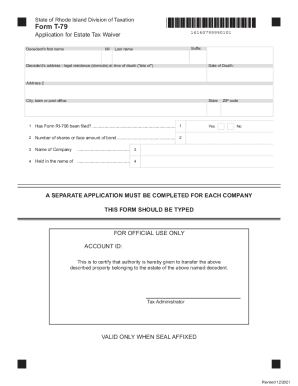
The RI DoR T-79 form is an important document required for the application of an estate tax waiver. This guide provides users with a comprehensive step-by-step approach to completing the form online, ensuring a smooth and efficient filing process.
Follow the steps to effectively complete the RI DoR T-79 online.
- Press the ‘Get Form’ button to access the application and open it in the online editor.
- Enter the decedent's first name, middle initial, last name, and suffix in the designated fields.
- Fill in the decedent's legal residence address at the time of death, including the street address, city or town, state, and ZIP code.
- Provide the date of death in the specified format.
- Answer the question regarding whether Form RI-706 has been filed by selecting 'Yes' or 'No'.
- If applicable, input the number of shares or the face amount of the bond in the appropriate field.
- Indicate the name of the company associated with the estate.
- Complete the section detailing in whose name the assets are held.
- Remember that a separate application must be completed for each company involved.
- Once all information is entered, review the form for accuracy before saving your changes. You can then download, print, or share the completed form as needed.
Complete your RI DoR T-79 form online today for a streamlined tax waiver application.
All eating and/or drinking establishments are required to charge and collect seven percent (7%) Rhode Island sales tax and a one percent (1%) local tax on the sales of meals1 and of beverages2 within Rhode Island. 1 Meal is any prepared food or beverage to be sold by the restaurant for consumption.