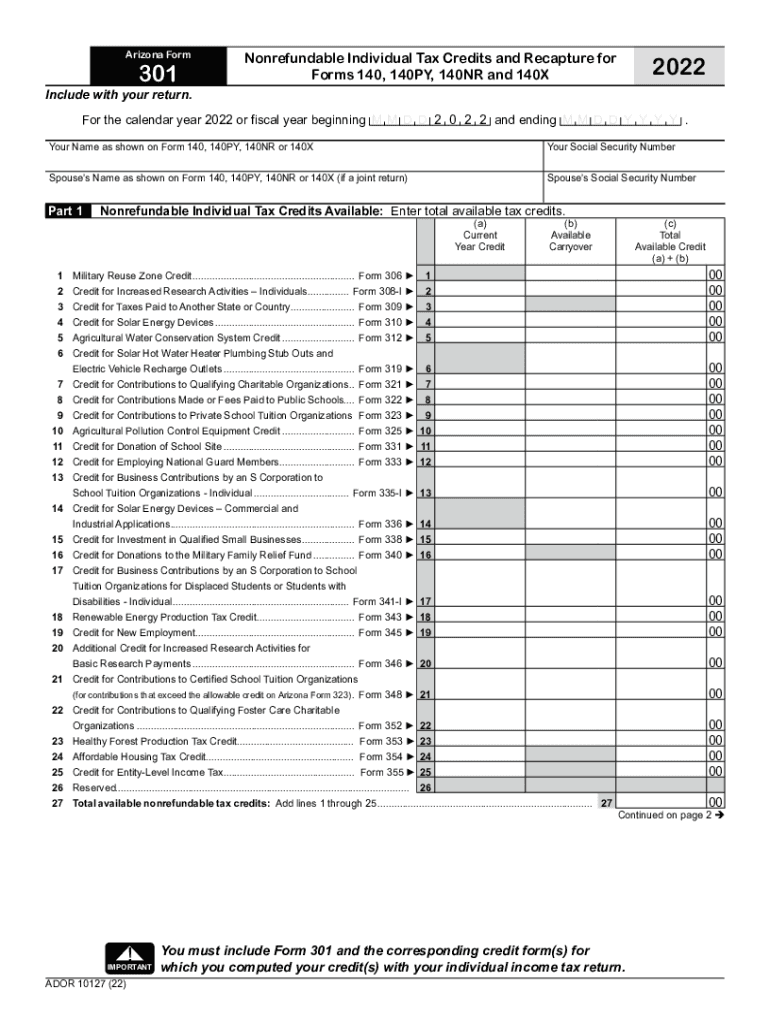
Arizona Form301Nonrefundable Individual Tax Credits and Recapture for Forms 140, 140PY, 140NR and 140 2022Include with your return. For the calendar year 2022 or fiscal year beginning M D 2 0 2 2.

Open form follow the instructions

Easily sign the form with your finger

Send filled & signed form or save
How to fill out the AZ DoR Form 301 online
Filling out the AZ DoR Form 301 online is a straightforward process that ensures you accurately report your nonrefundable individual tax credits for the year. This guide provides clear instructions tailored for users with various levels of experience in filing tax documents.
Follow the steps to complete the AZ DoR Form 301 online.
- Press the ‘Get Form’ button to access the form and open it in your browser.
- Begin by entering your name as it appears on the primary tax form (Form 140, 140PY, 140NR, or 140X) in the designated field.
- Input your Social Security number in the corresponding section below your name.
- If filing a joint return, also fill in your partner’s name and Social Security number as shown on the relevant tax form.
- Move to Part 1, where you will enter the total available nonrefundable individual tax credits. Start listing them in the provided fields. Include the appropriate credit forms next to each type.
- For each credit, make sure to enter the current year credit amount and any available carryover in the respective columns.
- Add the total available credits from lines 1 through 25 in line 27 to get the cumulative amount.
- Proceed to Part 2, and input the tax amounts from your primary tax forms in the relevant lines (lines 28 to 35).
- In lines 36 through 60, list the amounts of nonrefundable tax credits you have used this taxable year, ensuring accuracy before proceeding.
- Summarize the total tax credits used from Form 301 on line 63, ensuring that this does not exceed the available credit listed in line 35.
- Finally, save your changes, and download or print the completed AZ DoR Form 301 for your records.
Complete your AZ DoR Form 301 online today for a smooth tax filing experience.
Experience a faster way to fill out and sign forms on the web. Access the most extensive library of templates available.
Related content
Form YearFormInstructionsPublished2020Download (178.4 KB)Download (317.3...
301. 5,351 - 5,500. 56. 2,651 - 2,750. 279. 3,751 and up. 0. 3,851 - 4,000. 279. 5,501 and...
It became extinct in the wild in 1987 when all remaining wild individuals were captured...
Get answers to your most pressing questions about US Legal Forms API.
What is the Arizona Charitable Tax Credit?
The Arizona Charitable Tax Credit is a set of two nonrefundable individual income tax credits for charitable contributions to Qualifying Charitable Organizations (QCOs) and Qualifying Foster Care Charitable Organizations (QFCOs).
What is Arizona Form 301?
10993: AZ - Form 301, Nonrefundable Individual Tax Credits and Recapture. ... Part 1 of AZ Form 301 summarizes all non-refundable credit amounts, both current-year and available carryovers from prior years.
Use professional pre-built templates to fill in and sign documents online faster. Get access to thousands of forms.
If you believe that this page should be taken down, please follow our DMCA take down process here.
This form is available in several versions. Select the version you need from the drop-down list below.