Loading
Get Fl Dr-176 2021-2026
How it works
-

Open form follow the instructions
-

Easily sign the form with your finger
-

Send filled & signed form or save
How to fill out the FL DR-176 online
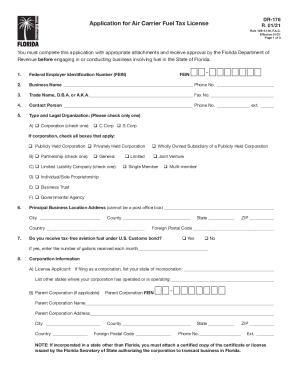
Filling out the FL DR-176, the application for air carrier fuel tax license, can be straightforward with the right guidance. This guide will help you understand each part of the form and ensure that you provide all necessary information for approval by the Florida Department of Revenue.
Follow the steps to successfully complete the application.
- Click ‘Get Form’ button to access the FL DR-176 application and open it in your preferred online editor.
- Begin by entering your Federal Employer Identification Number (FEIN) in the designated field.
- Provide your official business name and phone number. Ensure this information is accurate.
- If applicable, enter your trade name (Doing Business As or D.B.A.) along with your fax number.
- Submit the details of the contact person for your business, including their phone number and extension.
- Indicate the type of legal organization by selecting the appropriate box, whether you are a corporation, partnership, LLC, individual, or governmental agency.
- Fill out the principal business location address completely, including city, county, state, ZIP code, and foreign postal code if applicable.
- Confirm if you receive tax-free aviation fuel under U.S. Customs bond, indicating 'yes' or 'no,' and if yes, enter the number of gallons received monthly.
- If you are filing as a corporation, provide corporation-specific information, including state of incorporation and other operational locations.
- List the full names, social security numbers, FEINs, and addresses of all partners or corporate officers in the provided section. You may make copies if more space is needed.
- Review the affidavit section, ensuring all statements are complete and truthful. Sign and date the form as the applicant.
- Once all fields are completed, you can save changes, download, print, or share the finalized form according to your needs.
Complete your FL DR-176 application online today for a smooth licensing process.
To request a tax refund, file an Application for Refund - Sales and Use Tax (Form DR-26S) or Application for Refund - All Other Taxes (Form DR-26). An application form may be completed to request moneys paid into the State Treasury for a tax overpayment, payment when tax was not due, or payment made in error.