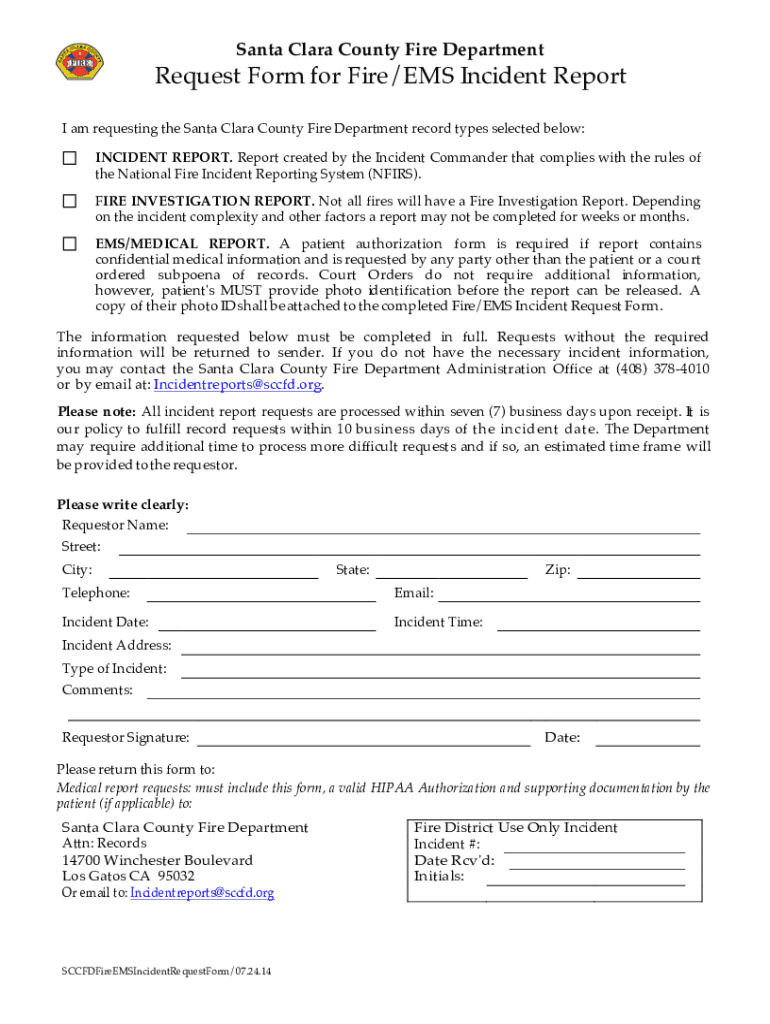
Santa Clara County Fire DepartmentRequest Form for Fire/EMS Incident Report I am requesting the Santa Clara County Fire Department record types selected below: INCIDENT REPORT. Report created by the.
Loading

Open form follow the instructions

Easily sign the form with your finger

Send filled & signed form or save
How to fill out the CA Request Form For Fire/EMS Incident Report - Santa Clara County online
Filling out the CA Request Form For Fire/EMS Incident Report for Santa Clara County requires careful attention to detail. This guide provides step-by-step instructions to help you effectively navigate and complete the form online.
Follow the steps to successfully submit your request
- Click ‘Get Form’ button to retrieve the form and access it in your preferred editor.
- Begin by providing your requestor information, including your name, address, phone number, and email. Ensure all entries are accurate and legible.
- Record the incident details, such as the incident date, time, and location. Be specific to assist in the processing of your request.
- Select the type of report you are requesting: Incident Report, Fire Investigation Report, or EMS/Medical Report. Each type may have specific requirements.
- If requesting an EMS/Medical Report, remember to include a valid patient authorization form if applicable. Attach the required photo identification if you are not the patient.
- Fill in any additional comments you feel may aid in your request.
- Sign and date the form at the designated section to finalize your request and confirm its accuracy.
- Submit the completed form, along with any required documentation, to the relevant address or email provided in the instructions.
- After submission, be aware that the processing time is typically within seven business days, though this may vary based on the complexity of the request.
Begin completing your CA Request Form for Fire/EMS Incident Report online today.
Experience a faster way to fill out and sign forms on the web. Access the most extensive library of templates available.
Related content
The purpose of the EMS Plan is to report changes that have occurred in the Santa Clara EMS...
Oct 13, 2014 — Alto Police Department, the California Highway Patrol, the FBI, and the...
Our mission is to protect human health and the environment by regulating pesticide sales...
Get answers to your most pressing questions about US Legal Forms API.
How do I contact Santa Clara County Fire Marshal?
To speak to the Fire Marshal in your city or town, please call (408) 378-4010.
What is the non emergency number for Santa Clara County fire?
For assistance, please call 408-378-4010 or email info@sccfd.org. We will return your call within one business day.
How do I report a fire incident?
If you discover a fire – CALL 911 immediately. If you are in a building and discover smoke or fire within the building, ACTIVATE the building fire alarm system by pulling a manual fire alarm station to warn the occupants.
How do I report a fire hazard in California?
Complaints related to buildings or building access should be referred to the Fire Hazard Advisor at 619-533-4411 or be submitted through the Fire Department Customer Complaint Page (For complaints related to brush or weeds, please see above for more information).
How do I contact Santa Clara Fire Department?
Contact Fire Prevention at 408-615-4970 or email at FPFrontDesk@santaclaraca.gov. How do I obtain a fire report? If you are looking for a Fire Incident, Fire Investigation or Pre-Hospital Care report, visit the Fire Report Request Form webpage for more information.
What is Santa Clara County Fire Mission Statement?
Mission Statement: As compassionate members of the community, the Santa Clara Fire Department protects and enhances the quality of life for the people we serve. We provide caring, customer-oriented service to protect life, property, and the environment.
How do I report a fire hazard in Santa Clara County?
Contact the Fire Prevention Division at (408) 341-4420.
Use professional pre-built templates to fill in and sign documents online faster. Get access to thousands of forms.
If you believe that this page should be taken down, please follow our DMCA take down process here.