Loading
Get Ky 42a741 2003-2026
How it works
-

Open form follow the instructions
-

Easily sign the form with your finger
-

Send filled & signed form or save
How to fill out the KY 42A741 online
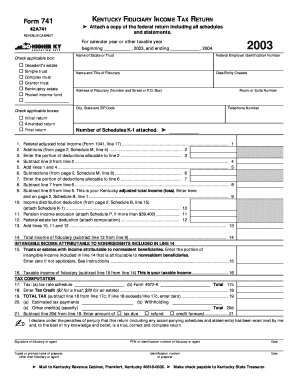
Filling out the KY 42A741, the Kentucky fiduciary income tax return, can seem daunting at first. This guide will help users navigate each section of the form with clear, step-by-step instructions to ensure accurate completion.
Follow the steps to successfully complete the KY 42A741 form.
- Click the ‘Get Form’ button to obtain the KY 42A741 form and open it in your preferred online editor.
- Begin filling out the form by entering the federal employer identification number at the designated field.
- Provide the name and title of the fiduciary, as well as the date the entity was created.
- Select the applicable type of entity by checking the appropriate box: decedent's estate, simple trust, complex trust, grantor trust, bankruptcy estate, or pooled income fund.
- Input the name of the estate or trust, and determine if this is an initial return, amended return, or final return by checking the relevant box.
- Fill in the address of the fiduciary, including the number, street, or P.O. box, city, state, and zip code. Add the room or suite number if applicable.
- Enter the telephone number for the fiduciary.
- Indicate the number of schedules K-1 attached to the return.
- Proceed through the income calculation section, ensuring that all required figures from federal returns are accurately transcribed, including adjustments, deductions, and any income distribution deductions.
- Review all completed sections to ensure accuracy, and when you have filled out everything, you can save the changes, download the form, print it, or share it as needed.
Complete your KY 42A741 form online today to ensure your fiduciary income tax obligations are met accurately and efficiently.
Form K-5. Form K-5 is used to report withholding statement information from Forms W-2, W-2G, and 1099 and is completed online with two filing methods to choose from. It may be filed electronically by clicking the submit button or the completed form may be printed and mailed to the address on the form.